I’m also still getting version 2.17.19. I have 11 cams with a cam unlimited account. I normally view my 7 outdoor cams in a browser window. If I get switched to four I’ll probably cancel my cam unmimited. The only reason I subscribed was to get the web view of all of my outdoor cams. Wyze could end up losing a lot of subscriptions over this change.

2 Likes
Consider Reolink, with their Windows Client.
Here is a picture of my 8 active cameras.
On the bottom of the Windows Client, you can pic from a menu of camera view options, with up to 36 cameras displayed at once.
I originally started with an OG camera but switched to Reolink as I started to buy more cameras, and OG Wed View developed a bug that Wyze was unable to fix. As of today I still think this 3 second shortened videos is still a problem.

3 Likes
I have 4 cams on page 1, 2 cams on page 2 for a total of six cams. I posted a pic yesterday of how I was able to zoom in and position two Chrome windows/instances side by side to get a overview of the 6 cams at same time. It was not full screen and not kiosk mode (OS Panel, clock and System Tray are still visible as well as Chrome’s title bar and borders/buttons are all visible now). I was able to zoom in on Page 2 and the two cameras would change position from being side by side horizontally (to the left and right of each other) to appear on top of one another in a vertical column. This allowed me to view all 6 cams in the 2 window setup yesterday as I showed in the uploaded pic.
As of last night, I noticed I was no longer able to do that. Zooming in on page 2 now leads to a bug. Once I zoom to a certain percentage, instead of the 2 cams on page 2 appearing on top of one another in a vertical column I now get a vertical column of 3.5 cams. The top 2.5 cams in the column are from page one and the bottom is one of the cams from page 2. The top cam view is only the bottom half of one of the cams from page 1. Very strange that this change happened only after I posted that pic. If I did not have a record of being able to view the 2 cams on page 2 vertically in a column, I wouldn’t believe it myself.

The window on the right shows the 2 cams on page 2 in a vertical column yesterday afternoon. As of today I am no longer able to do that. So this is no longer an option either.
Unbelievable. SMH.
1 Like
In Chrome, try doing split view with multiple tabs instead of multiple Chrome windows. I’d try, but don’t yet have access to the new Web View.
1 Like
I had previously seen your other posts about the truncated 3 second clips ( while using an OG and Web View open in Live View). The reason I had read all of that is I was a new Wyze subscriber this year.
I currently have 4 Wyze V4 and 2 Floodlight Cam Pros on site. I was trying to figure out why all of my notification videos were truncated to just a handful of seconds. They always seemed truncated and missed recording the most important part of the events. I did not have SD cards installed because I assumed if I am subscribing to Cam Unlimited, I would not need them. The recordings would all be in the cloud. The notification videos are extremely short, truncated and not of the whole event. I sometimes catch a few seconds of a person walking toward the door. And then another short clip of less than a few seconds of the person walking away several minutes later. There would be zero recordings or knowledge of what happened in the 2 or 3 minutes they were at the door. That’s an example. I basically wanted to know if this was expected behavior. The answer was . . . . It is – in order to save bandwidth, storage space and $ on the Wyze server side. I ended up spending an insane amount of additional money to put 256MB SD cards in all 6 cams. What kind of cam system with paid subscription does not record the entire events? Unbelievable.
Your issue with the 3 seconds was more extreme than my case but that is why and how I first landed on your posts about the subject. I think it is easy for other people to dismiss your experience and discount it as a one off, but it really should be considered as a serious indicator of the type of negative Wyze experience some subscribers can potentially experience.
I had planned to get many more cameras but that is now off the table due to this fiasco, the lack of Wyze response, and seeming indifference to my experience. I will be looking into Reolink as an upgrade as unfortunately now I am stuck with Wyze for another year. Thanks for sharing your insight bangaroo.
Thank you for the suggestion. I did not see that option as I use a delayed updates system for stability. I updated Google Chrome and was now able to see the new Tab Split View feature.

I now get this. It is not ideal as there is a lot of useless black borders taking up prime screen real estate that should be used for cam viewing. If i try to fix this by either zooming in only on the right tab or dragging the middle of the screen to increase the size of the first tab and decrease the size of the right, the bug appears. The view in the right tab changes to 4 cams, the 3 top ones are cams that are from Wyze Web View page 1 and the bottom cam is 1 of the 2 cams from page 2.

Notice the scroll bar on the right tab. What you are seeing is now the bottom 2 cams of 4 that show when zooming in. The bottom cam is one of the two from page 2 and the the one on top is the bottom of 3 cams from page 1. (If i were to scroll up you would see the other 2 cams from page one on that appear on top of these two.) If I zoom out or resize that tab larger, then it returns to a view of 2 cams from page 2 side by side and the 3 cams from page one are no longer visible. Why 3 cams appear from page 1 and one of the cams disappear from page 2 when zooming in on page 2 is beyond explanation. I was able to get it to look somewhat normal yesterday. Not today apparently.
Regardless, this is less than ideal. I was up until this update able to use this a dedicated Live view monitor. I could see all six cams in full screen, zoomed in with no borders and no operating system clock, system tray icons and notification pop-ups, title bars, window borders and buttons, etc. Instead I now get this clunky useless view.
Compare that mess to what I used to experience:
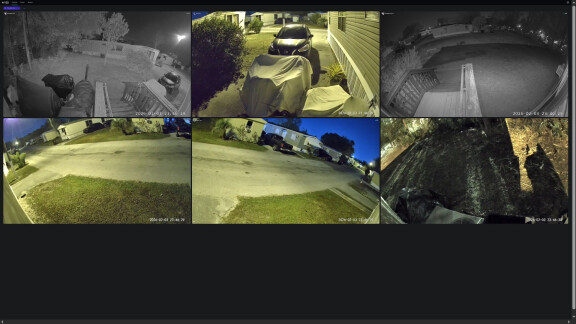
1 Like
For now, I am going to deal with this view. If I resize the tab on the right (page 2, cameras 5 and 6) until it becomes very narrow it will show all 6 cams, 1-4 from page 1 and 5&6 from page 2 in a narrow column.
The tab on the left has all four cams on page 1 open. I can switch to page 2 there if I need to see cams 5&6 close up. For now they are relegated to a small thumbnail on the right.
I can view this in full screen again (kiosk mode).

This is still not ideal and is reduced functionality with restrictions on the number of cams I can view at once.
I will have to deal with it for the next year I guess but I won’t forget.
1 Like
This new setup sucks! Only viewing 4 cameras at a time is Bulls*** !!
You need to offer an alternative format. If you cannot offer a return to the previous format then you will start losing customers. You obviously didn’t do any homework on this understanding the needs of your customers.
Guess I’ll have to start looking for another camera provider.
3 Likes
The New Web Portal Sucks!
The New Web portal is a disgrace. Being able to monitor more than 4 cameras at a time is a feature many rely on. Now only being able to monitor 4 cameras per page is a change that will drive me and potentially many others away from Wyze.
I used to recommend Wyze systems and now I will have to replace my cameras with a system that is suitable for home monitoring. You cannot properly monitor you cameras having to switch back and forth between web pages.
Whom ever made this bonehead decision at Wyze should be fired! You need to fix this and allow consumers to decide which format fits their needs. If you cannot or will not do that then you will lose customers.
[Mod Note]: Post moved to more relevant existing topic discussing this same product and/or issue for better visibility within the community.
3 Likes
Exactly. I don’t know what else I could say that can explain it any better than that.
3 Likes
This new version is a major step backwards. I am now in the process of looking for a better system and it will not be wyze. The previous version addressed my needs perfectly as it did most of the respondents. This new version with the black borders and initial limitation to 4 cameras instead of 6 is a negative surprize but a major dissapointment. I like change and moving forward with positive advancements, but this is a negative change and is not a positive move.
2 Likes
I wonder if anyone else besides me has contacted Wyze support? The responses I have received so far have been disappointing. The latest:
”We wanted to let you know that Wyze recently made an update to Wyze Web View, which may have affected how your cameras are displayed. This update includes improvements to performance, layout, and overall functionality, which could explain why you’re currently seeing only four cameras instead of all of them.
You can review the details of these changes and how they may impact your view in our support article here: What’s New with Wyze Web View.
If, after reviewing the article, you still notice missing cameras or any other issues, please let us know. We’ll be happy to guide you through any additional steps to ensure all your cameras appear correctly. Your experience is very important to us, and we want to make sure everything is working smoothly for you.”
And more similar canned type responses that almost seem like trolling at this point. I was first offered a 15 dollar credit that I could use toward future subscription payments and then it increased to 20. I made it clear I do not want their money. I want them to either revert their horrible changes and new cam limits restriction or quickly provide a page or method that can accommodate all 6 of my cams in LIVE view as I was able to do before this lousy Web View update.
I don’t get what part they are not understanding – the Web View update that imposes new restrictions and reduces functionality is not acceptable. I need a better way to monitor my site in Live View at once, not by clicking back and forth through multiple pages.
I do not have any use for their credit as I just renewed my subscription and it ends in 1 year. I will not be renewing and I will spend this year looking for a better cam system that supports real time monitoring and persistent recording. Wyze has proven itself to be unreliable, unstable, and the customer service as inept as their heavy handed design decisions.
I also had my web based interface change yesterday, 2-6-26. as of this morning when i log on it is back to the 9 camera view i use to monitor my property REALTIME. I don’t think that Wyze realizes how many people tend to use these camera systems like old style DVR systems as I do.
Like the others here in the forums I also prefer the old style NOT the 4 cams per page that it was for me on 2-6-26. If I wanted the 4 cams per page I would simply just use the app and not the web interface we all pushed for a few years ago.
3 Likes
This is a major step backwards and extremely disappointing.
Like many here, I have a computer dedicated to running a live view showing 9 of my 19 cameras (v3s, v4s and one Wyze Doorbell v2) Other than my doorbell, which would go months without a problem, and then it would fall off several times a day for a week, and then fix itself again, the old view would work fairly reliably, and didn’t require me to click to start it every day like this new mess.
With this new change, I can now see less than half of the cameras I could before, another step backwards by wyze. I was going to say that if this fixed the issue with my doorbell camera I might consider it an upgrade, but no, it has made the streams less reliable for me so far. So it’s not even like this has helped the one problem I had with web view.
Fail.
1 Like
I’m already installing the ethernet cabling because I am done with Wyze in every respect. I might renew for one more year as an overlap until the IP cameras and NVR are installed, but that’s it. Their products are not as weather resistant as they claim. Their USB adapters fail and need to be replaced multiple times per year (yet the replacements I bought for each failed Wyze adapter…never fail). Their “black-hole” technical support is 100% useless (unless wasting time is its purpose). Their connectivity issues they’ve had are always blamed on AWS, the clients’ ISPs, or the clients’ own setup. The sound quality of the speakers and the pick-up of the microphones has ALWAYS been a problem, and their products are manufactured in such a way that even after the warranty period, you cannot open them (without damaging them) to service them or replace their crappy components with better parts. I’m not sure if I should sell these things to someone unsuspecting (or a fan of Wyze stuff), or just toss it and swallow the whole loss.
1 Like
I do not like the new Wyze Web View design. There was nothing the wrong with the old one. Definitely a huge step backwards for WYZE, a company that wants to be leader in the industry. I am speaking on behalf for 99% of the customers who used the the old portal just bring it back. The new Web View design is useless as it does not have the user features of the old one.
2 Likes
I have not been so lucky. One laptop still shows the old interface and another machine, sadly, is still showing the updated version of Wyze Web view.
Anytime a cam disconnected in Web View I would just hit the Refresh button on the camera thumbnail to the left of the ‘Submit a Log’ button. If it became an persistent issue or affected more than one cam, I could just tap F5 on the keyboard in Google Chrome to refresh the page, forcing all of the cams to reconnect. A few random disconnects was to be expected and really didn’t bother me. What bothers me is this updated Web View that no one asked for, the new restrictions on the number of cams that you are allowed to view at one time in one place, and the reduced functionality. I was NEVER unhappy with Wyze until now.
Essentially, by removing the ability to actively monitor my cams in real time, Wyze has made it practically impossible to keep my home and my family safe. Event notifications, audible alarms such as “Hi, you are currently being recorded” and notifications are helpful but they are can’t reliably give me the complete picture I need. When I want to do a quick safety check I need to be able to see all the way around my house to ensure nothing nefarious is happening before leaving the safety of my home and stepping outside. Having to create multiple custom pages of 4 cams or less and then flip back and forth in order to know whether or not it is safe to step outside is not acceptable. Before now, I was able to do this at a glance all on one page.
It doesn’t help that the cam views doesn’t even take up all the available space on the web page and leaves huge borders of wasted space around the cam images. This results in rather small cam views that require me to click on each one to see it individually so I can actually see it. While doing this, I then have to wait for it to connect and load again. I tried zooming in and out as I did before to get the views to enlarge and maximize screen real estate but . . .
Try zooming in or out as far as your are able to (or resize the page using your mouse to click and drag the edges) in your web browser on the updated Live View page and see what happens. The page view of the 4 cams that you are required to customize for each page morph into some kind of amalgamation of some but not all of the cams. (I describe what happens previously.) It is atrocious.
I can tolerate occasional cam disconnects, unexpected bugs due to firmware updates, occasional cam retirement and replacement due to wear, inability to use 2-way talk on any of my cams, replacing older tablets and phones becoming obsolete and incompatible with an update to the Wyze app **, etc. But I cannot and will not tolerate this. (**And yes, on the last firmware update for my cams, my Fire tablet, which is only 4 years old was made obsolete by the Wyze firmware update. I had to buy a new tablet with a newer version of Android in order to continue to connect to my cams. To be fair, there was a notice warning me about this in the app before I applied the firmware updates.)
The worst thing about this experience, above losing functionality, is the lack of timely response by the Wyze app developers. This is the part that upsets me the most. No explanation as to why we are limited to less than 4 cams, no acknowledgment that the update has made our cams practically useless, and continuing to refer to these new restrictions and loss of functionality as improvements, feature upgrades and “all that and a bag of chips” (per their update announcement). Even if they were to roll back this update today, my confidence in Wyze will sadly never return.
1 Like
Well the all but worthless 4 cam at a time web view is back for me this am 2-8-26. After all the other BS that me and others have had to deal with from this company, if they keep taking away features and charging more for less (like they are doing here) all the “convenience & cost savings” of these products has vanished and you are better off with a standard DVR system. The only reasons i have sill used wyze services, even after all the data leaks/ account exposure etc. is the fact that they are cheap and convenient. This now means nothing as they DO NOT function the way me and the people here in this thread are and have been using them. If they stick with this new web interface they will be losing a larger chunk of customers then they realize , if they even give two [Mod Edit] which i doubt.
[Mod Note]: Post edited (partial grawlix) to conform to the Community Guidelines.