Wyze App 3.8 - Released 10/16/2025

App Updates!

We have new Android and iOS apps releasing today. Here are the details.

Versions:

  • Android:3.8.0.715
  • iOS:3.8.0.15

What’s new:

  • Added support for setting up Wyze Lamp Socket v2 using Wyze Cam Pan v4
  • Updated the doorbell camera settings page
  • Use Friendly Faces to automate your home with Wyze Cam v4, Wyze Cam Floodlight v2, Wyze Cam v3 Pro, and more
  • Bug fixes
5 Likes

Did this app break something? my cameras are only giving me still shots of events instead of the video clip now

Finally, finally Friendly Faces is getting some love.

I did a cursory look and I see within certain Automations there is now the ability to trigger on a “Family Member”.

I’ve been waiting a year to see where FF is going. Been dutifully training the AI.

Now to see if I can come up with something that automates “Family Member” notifications.

It’s a start. Well done Wyze. Keep going down this path. It can differentiate you from the hordes of inexpensive cameras​:+1::+1:

1 Like

We are looking into issues of this happening with Battery Cam Pros, do you see it happening on other cameras?

2 Likes

I’m seeing the issue on BCP events. No issue with Cam v2, Cam v3, Cam v4, CPv3, WCOv1, WCOv2 and Bulb Cam events. I have other cams models, but kind of busy right now. I think the issue is limited to Battery Cam Pro (BCP) events. Will submit some logs and post IDs in the other topic in a few hours.

Edit: Log IDs located here: Failed uploads on Battery cam pro Everything else works - #10 by Seapup

1 Like

Since the update to 3.8 I am unable to view any cameras after selecting one from the Favorites screen.

I have three Cam Pan V3, five Cam V3 . I tried restarting the cameras, logging out then logging back into the app. I have some cameras in a different city that I can’t view as well. here is a screen shot of what I see after selecting a camera to view live;

The app stays stuck on step 1 of 3. I can see the live view on the favorites page but no live view when selected. Also, I can’t access the SD card to view events.

WOW, this is the same issue I am experiencing since the update has been released.

On a few of my cams, but not all..(9 total)

I thought the issue was related to Amazon’s AWS outage that affected many companies that has happened in the last 12-24 hours.

Just heard on the NEWS Ring Camera’s are experiecing issues due to Amazon’s AWS service interruptions in the last 24 hours.

SO this may be due to the Amazon outage

So to me, it can either be the Wyze app update or the AWS outage ( Wyze uses AWS for your cams)

AWS is a mess. It started around 12:30am pacific time. I’ve never seen so many reds in downdetector. Many are fortune 500 companies. By 3am it seemed to be resolving but in the last hour (9am) it’s getting worse. Alexa is brain dead but so far my 85 devices (25 wyze) are hanging in.

Amazon blamed it on a DNS issue. Not so sure.

1 Like

Yes, I saw Amazon Web Services are down. I actually hope that is the problem. If it’s the app then we could be out for quite awhile. Today, I’m initializing a shift to a more commercial security camera solution. For several years I’ve enjoyed the economies of WYZE and a shift away will be a financial burden.

1 Like

I can tell the AWS outage has affected many companies and aspects of Wyse.

Even when I try to login to the Wyze Forum, you one has to wait to receive the SMS login verification code, it is taking forever to receive the code, that has to be entered for 2 step authentication. In the past it has ALLWAYS been fast, to reveive it, today I am wainting 5-10 minutes to receive it.

As far as the AWS outage,the news just reported Amazon is still looking into what caused it..

Major outages like these should be a wake call for companies and users.

Even thieves would learn from this, and say, Hey, now is a good time to break in, as Home Securtity Systems that rely on AWS are down…. Ring is experiencing this, and I am sure Wyze is too, but hasn’t said much yet…

Major outages like these, even when Amzon says they recovered, will take a day or two, for ALL other companies, that rely on these services, to also recover..

So we will have to wait a day or two, to see what happens with any Wyze cam issues, if the resolve themselves…..Which I am confident this is the case for the this issue below

THis is what i am experiencing with just a few of my 9 cams

Reason the other Working cams are not experiencing the issue, is most likely due to those cams services are residing on Wyze AWS servers that were not affected.

As prior to the last few days, I did not have this issue, and nothing has changed on my side of the equation.
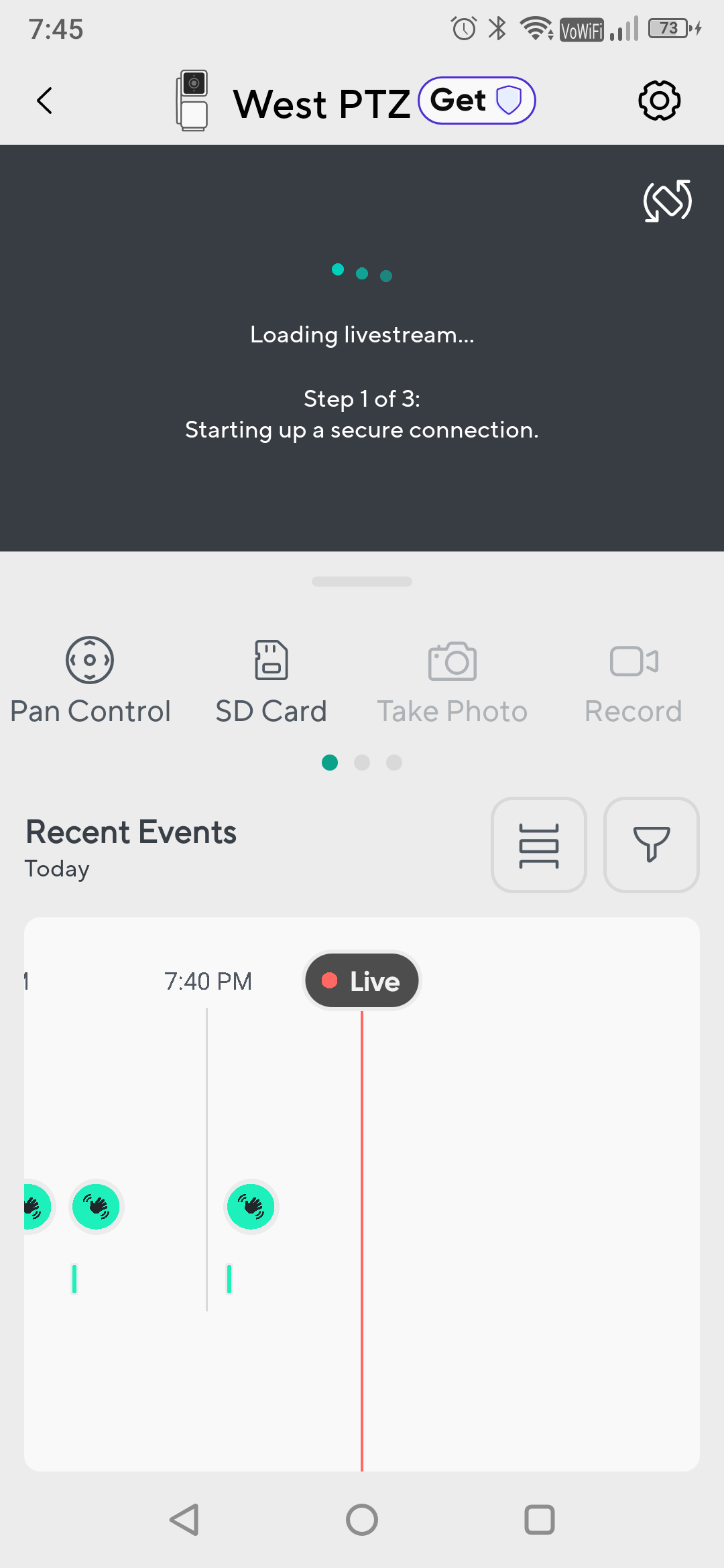
Screenshot_WYZE camera

I dont believe Amzon in saying itt was a DNS issue.

My first thouhgh

China….

China has been attacking huge areas of internet infrastructure, more so in the last 3-6 months.

and I cannot stress enough

One day soon, we are going to have a really bad day, regarding the internet

China has been hacking pretty much everything

And if the U.S. and China gets into a war over Taiwan, China WILL be attacking our infrastructure

Gov/Bus etc

It a very large topic/ and overall concern.

Side note: Wyze SMS Login code, just came in,

I asked for it, to sign in, over 15 minutes ago

Its never been sooo slow

Use to take 5-10 seconds at most

Sign of AWS issues./ outage

Forget to note

I am on the east coast, (NJ)

And from what I have heard is the outage is on the easy coast

Which is kind of useless info by them

As many customers of these services could be located anywhere in the U.S.

I am having the same problem with the cameras not loading and it happened right after an update that I downloaded I’ve been hoping for another update soon maybe it might fix it in the meantime I have downloaded tinycam pro and then using that app just fine.

I’m having the same problem after the update I have 13 cameras and half of them will not load. I was hoping wyze would come out with a new update resolving this problem.

I have found the fix to address the

““ Loading Livestream ““

““Setting up a secure connection”

Turn OFF

““ Enable Hardware Decoder “ setting for each Wyze Cam

I no longer have the “Loading Livestream” being stuck, and never finish loading, after turning OFF

“Enable Hardware Decoder” for ALL my cams, that support Hardware Decoder.

Early gen Wyze cams wont have this setting

Overall, the issue is with Wyze/ and the APP.

As my cams all worked fine with the Enable Hardware Decoder up until the last week or so…

Hope this helps!

Please let me know if it worked for you

THx

Didn’t work here. I submitted a log & lo & behold the Livestream fixed. Pity they can’t fix the “No Video Available At This Time” problem most of seem to eventually get when there is nothing g wrong with our SD Card, Setup, Internet, USB cable yada, yada

Hmmm Interesting…..Not sure why it worked for me, and not you….

Out of curiosity, What OS/Phone are you using?

I wish for moths back, when my cams /app were working speedily….

Oh those were the days

I notices since the updated the AI aspects within their app the one cam I have assigned to the monthly service, is now slower, than those cams that are NOT assigned to the paid app/service.

I blame this issue on the overhead the cams that are assigned to the monthly service, and the AI features now taking up more processing power/resources, and internet speed.

Samsung & Android 16

Thanks for letting me know

Hmmm

Overall, since you submitted the cam logs

are all your cams fixed?

The fact that after you submitted the log on the cam you experienced issues, started working again after the log was submitted, tells me they must have did something on the backend after the log was submitted….

As the issue doensn’t fix itself