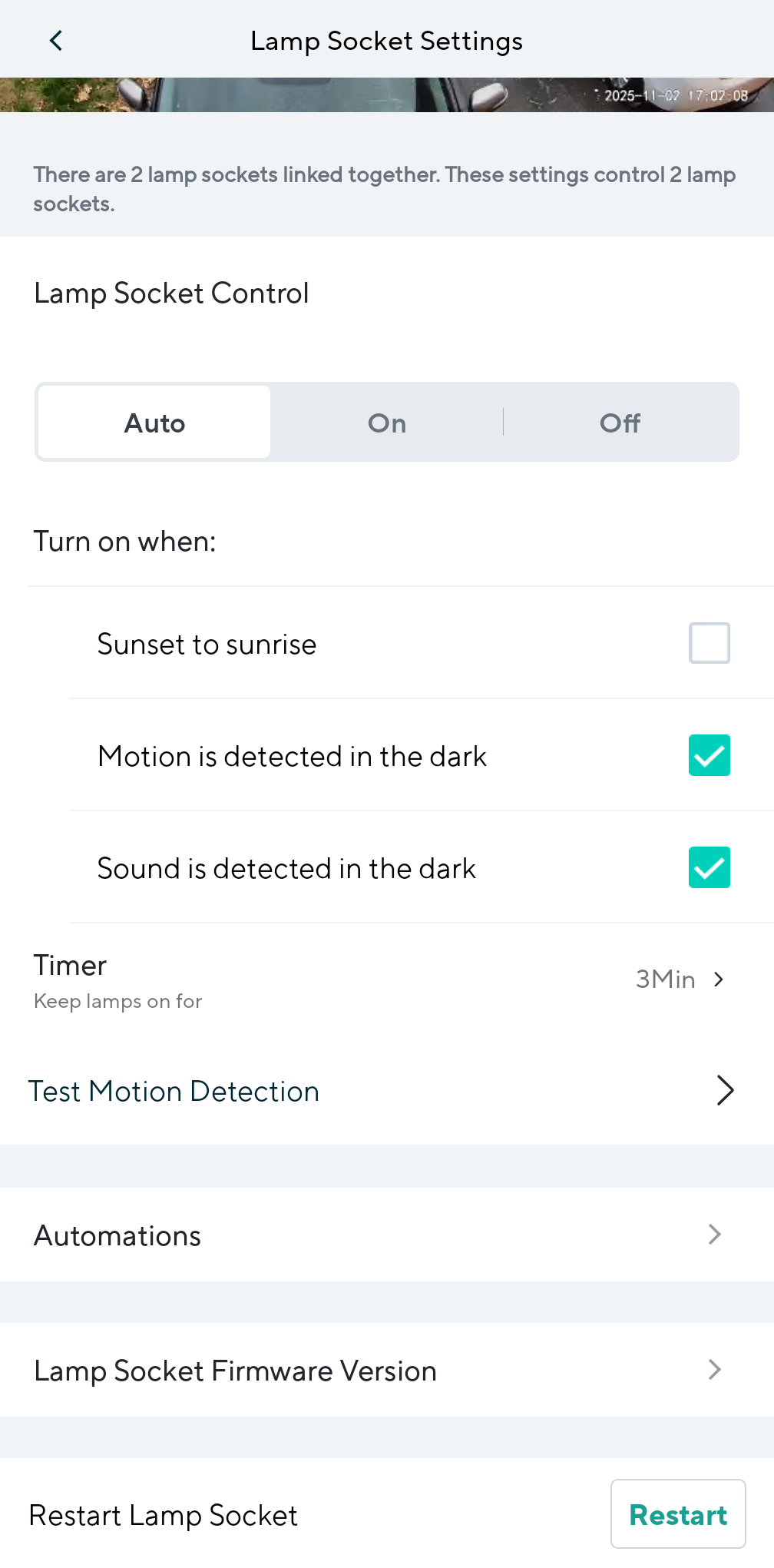
I have a Wyze cam V3 and a V4, all connected to Wyze lamp sockets. The V4 is on my driveway and controls not only my garage light but a second lamp socket on my porch. The V3 is on my backyard and controls my backyard lamp.
My problem is that the V3 camera is taking over all lamp sockets and not letting the v4 camera to turn on the lights when it detects movement on my driveway. And, unfortunately, every movement in the backyard triggers the lights on my driveway and porch…
How can I prevent my V3 to do that? I need the V4 to control the 2 front lamp sockets.
You could replace all of the Lamp Sockets with the v2 version, but that shouldn’t be necessary. If you currently have two in the front and one in the back, then my inclination would be to replace the one in the back with Lamp Socket v2, and that should allow you to have two distinct groups. You might have to set up the two Lamp Socket v1s with the Cam v4 again if you do that, but eliminating the single Lamp Socket v1’s connection to your Cam v3 may be enough to resolve this.
Incidentally, I asked the bot in the Help Center about this and got conflicting answers. I initially asked, “How can I have separate groups of Lamp Sockets that operate independently of one another?” The answer that it gave seemed incomplete and potentially misleading, so I then asked, “Is that advice accurate for Lamp Socket v1?” This is how the bot responded after that second question:
Maybe the bot gets qualified partial credit? It’s good to be a human and continue to use the human , I think.
Thank you very much for your answer. I’d love to try the new lamp socket V2, but I can’t find it here in Canada. I’ll try that for sure once I get one.
I used to have my 2 lamp sockets tied to my Cam V4, and now all the V3 cam decided it would run the parade.
Hopefully, Wyze will start to sell the new lamp socket on Amazon Canada.
You’re welcome! That blows that Amazon Canada doesn’t currently carry Lamp Socket v2. I’m seeing the same thing when I search for it on amazon.ca, though amazon.com in the United States does show it.
Now I’m curious about something else: If you do something to attempt to trigger motion at your driveway Cam v4, then do those lights turn on and also turn on the lamp in the backyard? I’m wondering if it’s working in both directions or if the Lamp Sockets are activating only when the backyard Cam v3 detects something and completely unresponsive to the Cam v4. I don’t have any Lamp Socket v1s, so my experience with these involves only Lamp Socket v2.
If your Cam v4 detections aren’t activating the Lamp Sockets at all and that’s what’s most important to you (unless/until you can get Lamp Socket v2 and separate the groups), then I wonder which Cam/Socket combination has been set up most recently and if going through setup with Cam v4 and the Lamp Sockets now would transfer control back to Cam v4. Really I’m just speculating, so I don’t know if that would yield a useful result or not.
I ordered from amazon US and it will arrive this Wednesday. I also checked Wyze Canada and it is only 4 bucks cheaper than importing from another country (lol), but the delivery date is way longer and I really wanted to test it before my trip this Friday.
The V4 on my driveway defects movements, no problem, but it won’t turn on the lights. When I check the app there’s no lamp associated to this camera.
Now, if a rabbit crosses my backyard, the V3 Cam detects it and turn on not only the backyard light but also my driveway and porch. The V3 is running the show here.
Then I kind of solve it (temporarily?): I powered down the V3 completely and restart the V4. The V4 is now back online and took over both front lamp sockets.
Then I powered the V3 back on.
For now everything seems to be working as intended. I still don’t know if (or when) the V3 will take over again, but at least I have this working until the new lamp socket v2 arrives.
This is the V4 working with the 2 lamp sockets after I shut down V3 and it’s respective lamp socket.
The V4 never took control of the lamp socket in the backyard. Don’t know how the V3 managed to get the 2 light bulbs in the front. But so far, so good …
I appreciate the update, and I hope the Lamp Socket v2 provides an easy working solution for this. I’m also not sure what causes the Cam v3 to take over (maybe the first time it detects something and tries to trigger the socket?), but I’m glad you’re getting the effect you want for now, and I would expect the Lamp Socket v2 to provide a longer-lasting fix because it will give you a second distinct “group” for your sockets.
Additionally, when you use that to replace the Lamp Socket v1 in the backyard lamp, you could potentially repurpose that v1 to a lamp or light fixture indoors and then have a visual indicator of when your Cam v4 sockets are triggered.
Id like to add more info to my issue. I found this post that describes EXACTLY what I’m facing since my upgrade to Wyze Cam V4
That’s why my other V3 Cam is taking over. The V4 sees the lamp sockets when I reboot but it “loses" them after a few minutes. Then my V3, connected to another Wyze lamp v1 socket, takes over of them all.
So, now I have a lamp socket v2 coming in 2 days, but I fear that this will not solve my issues completely.
Yes, I believe the lamp socket V2 can prevent my Wyze Cam V3 to take over the other lamp sockets, but how to prevent the Wyze cam v4 to ignore the lamp socket it is connected to (plus the other one it supposed to control as well)?
That’s cool that you found a related topic. Thanks for linking that. I read it, and the sense I’m getting from the description is that there might be a firmware issue that glitches Cam v4’s communication with Lamp Socket v1. Apparently, that’s unresolved (if that’s what it is), and for that reason I’d probably submit a log from the app and open a ticket with Support so that you can pass along an issue description with the Log ID and let them know that this continues to be an issue that the engineers should investigate.
Unfortunately, I think this information also introduces a wrinkle into your plan for solving this, because if your Cam v4 is dropping its connection to its accessory Lamp Socket v1 and not reconnecting, then you’re likely to have a working Lamp Socket v2 in the backyard and two Lamp Socket v1s at the front of the house that still aren’t responding as expected, and that’s frustrating. Wyze needs to hear about this problem and fix it.
If you had chosen to go the other way around—continue using a Lamp Socket v1 in the backyard and get two Lamp Socket v2s for the front—then this shouldn’t be a problem (as long as you have good Wi-Fi coverage), because Lamp Socket v2 doesn’t require a physical cable connection to a camera. Its USB-A port can power a Wyze Cam, but each Lamp Socket v2 has its own Wi-Fi connection on your home network once it’s been configured, so linking them is different than with Lamp Socket v1 and it’s possible to have them as separate groups. I would’ve taken the same route you’re taking, though, because buying a single Lamp Socket v2 costs less.
I guess at this point you can try proceeding with the current plan (I would), and then decide on other options if it doesn’t work out as expected:
Get a second Lamp Socket v2 and then use your Cam v3 and a Lamp Socket v1 in the backyard and use your Cam v4 and two Lamp Socket v2s at the driveway and porch.
Move your Cam v3 to the front and use it with two of the Lamp Socket v1s; move the Cam v4 and Lamp Socket v2 to the backyard.
Neither of those options is ideal, especially if you’ve already chosen your Cams and their locations based on their features and the views you want. I really do think that Wyze needs to know about this problem with Cam v4 and Lamp Socket v1 so that they can hopefully address it with a future update.
Thanks for helping me on this journey. I marked your last input as a solution to my problem.
I will end up getting a second lamp socket V2 as you suggested. The whole reason I updated to the Wyze cam V4 was to have a better image quality from my driveway.
I opted for Wyze products over Google/nest due to the price, but now I’m afraid to think how much I already spent on 4 cameras and (now) 5 lamp sockets…
It is a bummer how easily we can end up with electronic waste just because of a firmware update or a glitch that was never patched (notice the date of the post I brought up here, it’s been a year and they never fixed it).
If I figure out how to send logs to Wyze I’ll definitely do it.
I figured it was probably something like that and/or maybe because you also have a built-in spotlight with it. Either way, I don’t blame you at all for wanting to keep the Cam v4 in the front and the Cam v3 in the back.
I did notice that, yeah. They used to do this “Fix-It Friday” thing every month across their various communities (Wyze Forum, Discord, Reddit, etc.) to try to identify and focus on addressing high-priority issues (whatever was getting the most votes from the community because of comments and upvotes showing how many were affected), but my understanding is that they’ve shifted to trying to address problems as they’re made aware of them, and I think log submissions and ticket follow-up helps with that.

 , I think.