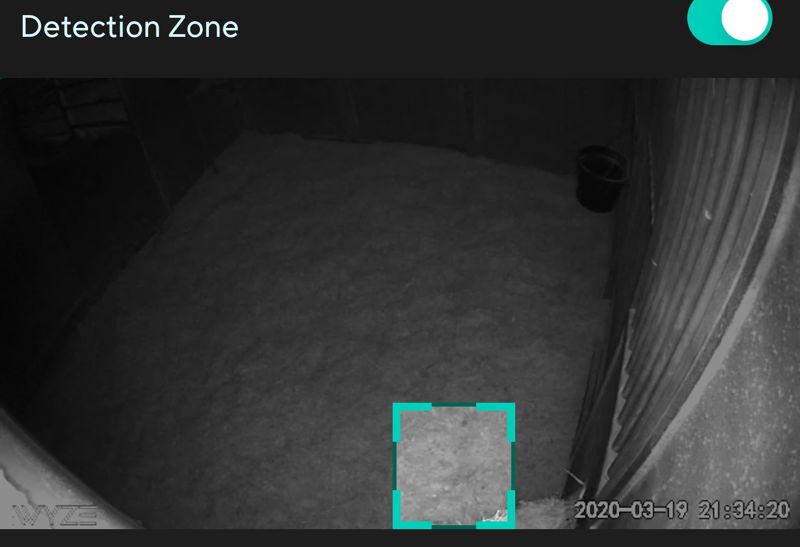
Since the last update (android) the detection box size has been limited. In the past I could make it as small as I wanted. This way I can avoid trees, bushes etc. The new software only allows a much larger box. How can I go back to the previous software?
Thanks
Rick
[Moderator note: subject title changed slightly for clarity]
You should still be able to adjust the size of the detection box. This would be under camera settings, detection settings, detection zone. Let me say mine work and I am update on firmware and app. PD is working.
I am using Android app v2.9.29.
I can set the detection box to a square about 1/3 the screen height and, being square, the same width. Were you able to make it smaller than that before?
I used to make the Detection Zone as small as possible. Now seems to default to a size that is too big for my use.
Does anyone know how to reduce the default detection zone size-Like it used to be?
Update to new v2.9.30 and cant adjust the detection zone box any least then half the screen, use to be able to adjust it to a thin box on old app, any thing I can do to fix this?
There is another thread about this same subject - obviously a change in functionality.
EDIT: I’m on 2.10.3 WyzeBeta app
However, you state (I’m paraphrasing) “to no less than 1/2 of the camera’s portal”, which is in contrast to what others can mask, ie, to a rectangular smaller than 1/2 the portal… for example , I can select a rectangle much less than 1/2 the portal view
Sorry I didn’t realize there was another thread, but yes before I updated the app to the v2.9.30 yesterday, I could select a rectangle much less then 1/2 the portal same as in your pic, but now It will only adjust down to half… Is there a way to get that back?
I have the same problem, zone no smaller than 3/4 of field.
going to beta version did not help.
This makes the cam almost unusable due to interference
from unwanted devices.
I did not have this problem several months ago. Must have
happened from a automatic upgrade.
I tried going back to old version and it remains a problem there, and went to beta version and same problem, contacted tech support and she said it’s the norm for now, that I could suggest a fix in wishlist or roadmap, and I looked in both and there’s other suggesting better control or even a new grid system
One of the recent updates has made it so I can’t reduce the size of the detection zone enough, I went it to adjust it slightly and it jumped and made it much larger and can’t reduce size enough.
I really like the Cam Pan but the area I’m monitoring for motion is a bit smaller than what the zone setting allows. Is there any way to shrink the zone box further? Perhaps Wyse could allow this in a future firmware update.