FYI - Despite the system status saying there are no current issues, I cannot upgrade firmware my brand new Bulb cam. When I called (after being on hold for 45 minutes) I was told there is a known issue and they were working on it. If the firmware upgrade didn’t put a warning that was not able to be dismissed I might be able to use it in the mean time. Do better Wyze.
2 Likes
Welcome to the Forum, @rdorman! 
What troubleshooting steps have you attempted? It’s been a while since I’ve tried updating firmware on a Bulb Cam, but I’m aware that Wi-Fi signal strength can be an issue and that some sconce types can interfere with the connections, particularly if there’s too much metal surrounding the device. (I think this has been part of my problem with one or both of the Accessory Bulbs I’m using being “Offline” periodically, because there’s enough interference that the BLE connections drop. It’s frustrating.)
Something that’s helped me in the past when I’ve had Bulb Cam and Accessory Bulb firmware update failures is to bring the devices inside temporarily to install them in a lamp socket closer to my Wi-Fi source. Once the update completes, I move the Bulb Cam and Accessory Bulbs back outside. That might be easier said than done depending on the accessibility of the light fixtures you’re using, but if you can get to your Bulb Cam’s current socket without too much effort then it might be worth trying.
2 Likes
Thanks for responding. I have gone through every KB, phone AI and Wyze Wizard on the phone instructions. From restarting, to readding, to moving it closer to the AP, to making network changes, to quitting the app for 10 minutes etc etc etc. Again, my issue is less that this doesn’t work and more that the agent on the phone reported
- This was a known issue that was not documented publicaly anywhere. The “engineering” team told her the Bulb cameras had a problem
- I would hear an update today. No update recieved.
Tech problems happen, i’m a Network Engineer. Communication with your customers and being forthright is a key part of success in this industry.
2 Likes
and this is part of the reason our team was made  After they got above a certain number of customers it got a little bit harder to keep eyes on issues and luckily our team can bring issues to the forefront of who needs to know much quicker and much more efficiently being nerds ourselves. What firmware are you currently on and does it tell you what your update firmware would be? We might be able to get some more information on this one.
I’m on 21.1.1.0526. Its offline at the moment I can get the suggested version tomorrow. One of my hail mary’s was to switch to the beta train, i can switch back b/c the upgrade never worked.
The other challengin part is that the modal popup for the upgrade cannot be dismissed. This means if the camera is online, you cannot get to the settings to get info or remove etc.
So in looking at that firmware it appears that that is a color bulb, and you already explained that you’re not part of the beta already so that’s fair, but It appears that you maybe possibly be a couple of firware updates behind, I wonder if that is causing some issue for some reason and bringing it in and dioing a full reset on it might take it back to its shipped firmware and allow you to do a better update.
It’s just a thought but that is one of the things that I would try if I were you. I know in the past I and the team have had to do such things for managers that have asked, And I can’t recall any of those times not working out for US. So it would definitely be worth it to try and do a factory reset on it and then try the update. But make sure when you do that if you have the availability to put it in a single bulb lamp that is in the same room as your router so you have the best signal possible and there’s no interference from anything else. Or at least minimal interference I should say. We know how that goes in this day and age.
and if this might help if you decide to take that route.
1 Like
Its actually a Wyze Bulb Camera, no color
1 Like
OK that explains why I had difficulty finding that firmware then. And that also explains the issues I think. You may have received a product with pre public software on it and as such it might have trouble updating there ( sometimes they will only update with the app used for testig with is not public.). On the bulb CAM firmware, everything I’m seeing as of June 6 your firmware is earlier than that.
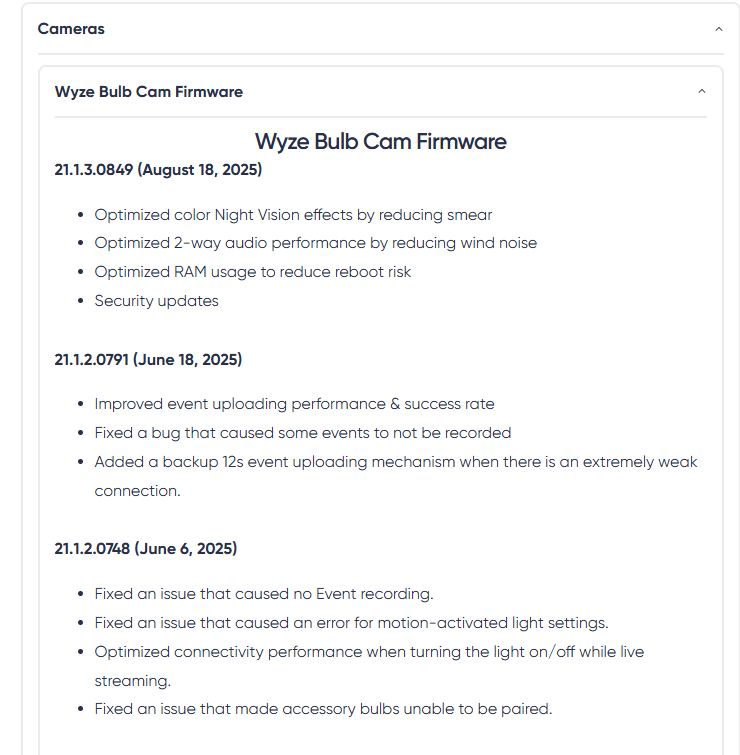
Obviously not something that happens commonly but is a different possibility. I would definitely try a factory reset on it and see if it allows you to update there, and if it doesn’t I would reach out to customer support to see if you can’t return it. And let them know that Support articles give the following firmware releases and yours is not included.
Factory reset is one of the steps i’ve tried several times. At this point I will just have to hope that Support responds.
1 Like
Keep me updated and let me know what they say. Especially when you can pull up the page and explain that the firmware you’re on isn’t even listed showing that it’s currently not supported which is why it won’t update. Being that this bulb wasn’t released that long ago and it’s well within the warranty. I wouldn’t think you would have any issue but again I don’t work for the company so I don’t know exact procedure and policy.
I just ordered and received, still in the box, two of those color bulbs. I guess I’ll know to update the firmware right off the bat - if they show up in my account after setting them up. Got three new Pan Cam v3’s so I’ll do firmware updates on them too.
Did you clear the cache, too? Glitchy cache data seems to cause weird problems occasionally, and on Android I tend to clear both the in-app cache and the OS-level cache when I’m having an issue, but I don’t know what your options are for that on iOS.
Yeah, this is the first I’ve seen of it being “known”.
I agree with that completely and have expressed the same kinds of sentiments many times here in the Forum.
You can also navigate from the app’s Home screen to Account ➜ Firmware Update to see your devices’ current versions and the latest versions offered if you’re curious about what’s supposed to be available.
I have the same issues and have the same firmware version (21.1.1,0526] and just got the camera today and cannot get it to update.
2 Likes
Yes, I have the same issue
Step right up… buy a camera! broke out of the box! no ETA for a fix!
Hi R,
Thank you for following up with us. I completely understand how frustrating it must be to have your new Wyze Bulb Cam unable to complete the firmware update, especially after taking all the troubleshooting steps. I sincerely apologize for the inconvenience this has caused.
I want to assure you that our engineers and technical team are actively working on a fix for this known issue. While I don’t have an exact timeline just yet, we will notify you via email as soon as a solution is available and the firmware update can be completed successfully.
We truly appreciate your patience and understanding while our team resolves this. I know it’s not ideal to wait, and we’re doing everything we can to get this fixed as quickly as possible.
Thank you again for your continued support of Wyze. If you have any other questions or concerns in the meantime, please don’t hesitate to reach out.
Warm regards,
J—- | Wyze Wizard
Ok so just saw there’s now an option to click “cancel” for the upgrade which allows you to go to the setting for the camera. Hopefully the firmware upgrade will get fixed but for now you won’t “have to” upgrade.
Are you on iOS or Android? (i’m on iOS and there is no cancel)
Any luck i am stuck on the same thing.
I use iOS and now on my app it doesn’t give any update info it goes straight to the settings. Maybe you need to uninstall and reinstall the app?
Also, I did put in a support log on my problem not sure if that helped but they never told me this. I just found it out for myself when I went in the app and was able to click cancel but now it doesn’t even come up for an update. So if you haven’t filled out a log, I would do that if I was you, but if you have maybe try Uninstalling and reinstalling the app?
However, if I go into firmware update, it does show it needs update, but at this point, I’m definitely not clicking on it.