Please allow control of Floodlight from the single press of Wyze Switch under “Smart Control”.
[Mod Edit]: Title and tags modified to be more inclusive and to enhance search clarity.
Please allow control of Floodlight from the single press of Wyze Switch under “Smart Control”.
[Mod Edit]: Title and tags modified to be more inclusive and to enhance search clarity.
While you are waiting, try this! (substitute “Turn on Floodlight” for action):
The Wyze floodlight needs to be smarter. I had hoped there was a way to activate and deactivate the floodlight using a Wyze switch. The option is there to operate Wyze bulbs using the switch while not actually turning off power to the bulbs. It needs more seemless i tegration.
Can we have input from a Wyze member about this matter? Will this be added to the device/app soon?
I was shocked to see that I can’t add the BR30 bulb to the Wyze Switch using Smart Control. Creating rules is a lengthy workaround and doesn’t fully allow for double or triple presses.
The lack of floodlight control via switch or via Google Home is the only reason I haven’t replaced all three of my floodlights with these. Common guys…
Wyze Switch disables floodlight motion sensor
Is it possible to have the Wyze Switch easily control the floodlight without disabling motion detection after manually turning off the light?
This was my first thought too - but sadly… it just doesnt work. Youll setup the rule correctly, turn on the switch - and nothing happens. Minutes later, still no change. Just a bug in the rule/automation system i guess. Sad it doesnt work though, and even sadder that the devs didnt build this functionailty in directly. Agter all, its a light switch.
It’s frustrating when the app lets you set up automations that wind up not being executable. It’s hard to know what you can and cannot successfully accomplish without actually purchasing the hardware to try it. I very much would like to control my 3 WyzeCam Floodlight Pros with a single button press of the switch, but alas - though the app allows the creation of the automation, it does not work. This, confirmed by Wyze support. " Unfortunately, the current feature set of the Wyze Switch does not support turning on and off the floodlights. Instead, using the Wyze Switch will only control the camera itself." Where’s the value in that? I may be unique, but I’ve never thought, “I should turn my outside camera off”. (Yes, I can see scenarios where this is helpful, but… more helpful than controlling lights, when the lights and camera are so tightly integrated?)
So now I sit on $500 of floodlights that I can’t get to work the way I want because… Wyze makes the switch, Wyze makes the floodlights, the switch works with automations… kind of…
@Wyze Developers
Problem Statement:
As a user, I would like a way to have a smart switch turn on/off the flood light without turning on/off the camera.
Current Workaround:
Potential Solutions:
Solution A:
Allow a workaround stated earlier in this thread to work. Specifically, allow automation to trigger flood light from switch on/off. Currently this option does not appear to be working. When my switch is set to Smart Control and no device, the indicator light will go on and off with single press. Automations to control flood light will not be triggered along with this on/off.
Solution B:
In the switch config, change the single press “smart control” mapping to have 2 triggers (switch on/switch off) and allow mapping of triggers similar to the double/triple press in the “additional Options”
Solution C:
Much more difficult, but much more friendly option, would be for the switch to detect devices that are on the switch circuit and have options for handling things without even using wireless.
Bring back the ability to toggle a Wyze Plug with a Wyze Switch single-press action
At one time, a Wyze Switch (Wyze Switch | Smart Wi-Fi Light Switch) could toggle a Wyze Plug (Wyze Plug | Best Smart Plug, Wi-Fi Outlet & Wall Plug) on and off with a single Switch button press. This is a very convenient setup if you have a room with a “switched” outlet in a place you don’t actually want a lamp. You can permanently power the “switched” outlet by putting the Switch into Smart mode, then connect a normal lamp to the Wyze Plug and plug that into any outlet you want.
At some point in the last few years, the ability to assign Switch “Single-Press” actions to a Wyze Plug has gone away, and only light-related products (like Wyze Bulb, Wyze Bulb RGB, Wyze Light Strips etc.) are shown as available in the Switch single-press actions menu.
The Wyze Plug is still controllable through the Wyze Switch “Additional Controls” where double/triple press and “Press and Hold” actions can be assigned, but since these are one time actions and not toggles, turning the Plug on and off requires different button presses, which is very unintuitive.
Normal Wyze Automations do not appear to function at all for the Wyze Switch, only actions assigned through Additional Controls. Attempting to use automations through other systems like Google Home (where you can set “When Switch turns on, turn Plug on”) also do not work, so I suspect the Switch does not send normal automation triggers at all.
I would like to have the option to control Wyze Plugs through Wyze Switch single-press actions again, or for Wyze Switch Automations to be functional so I can build an event chain (“When Switch turns on, turn on Plug”) so I can have the same intuitive functionality again.
[Mod Note]: Your topic, associated replies and votes were merged to this Wishlist request for better visibility and consistency in grouping similar requests.
Can you post an image of your smart Switch Single Press setting?
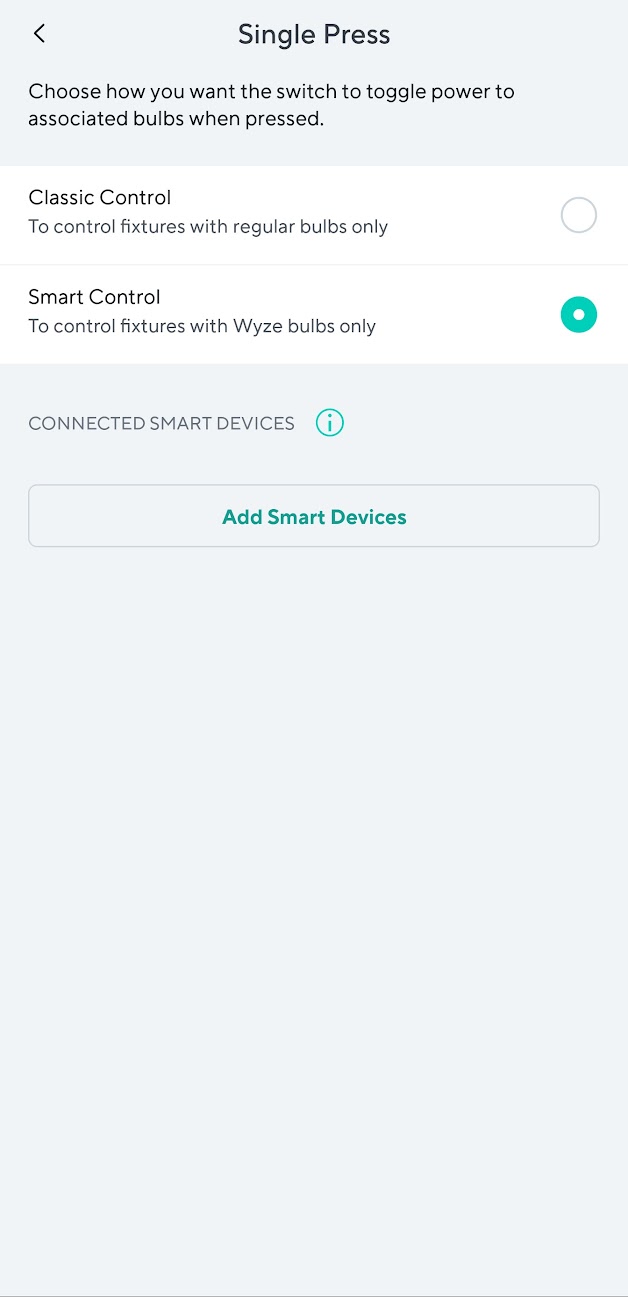
To use the Single Press option, you need to make sure that it is in Smart Control and not Classic Control.
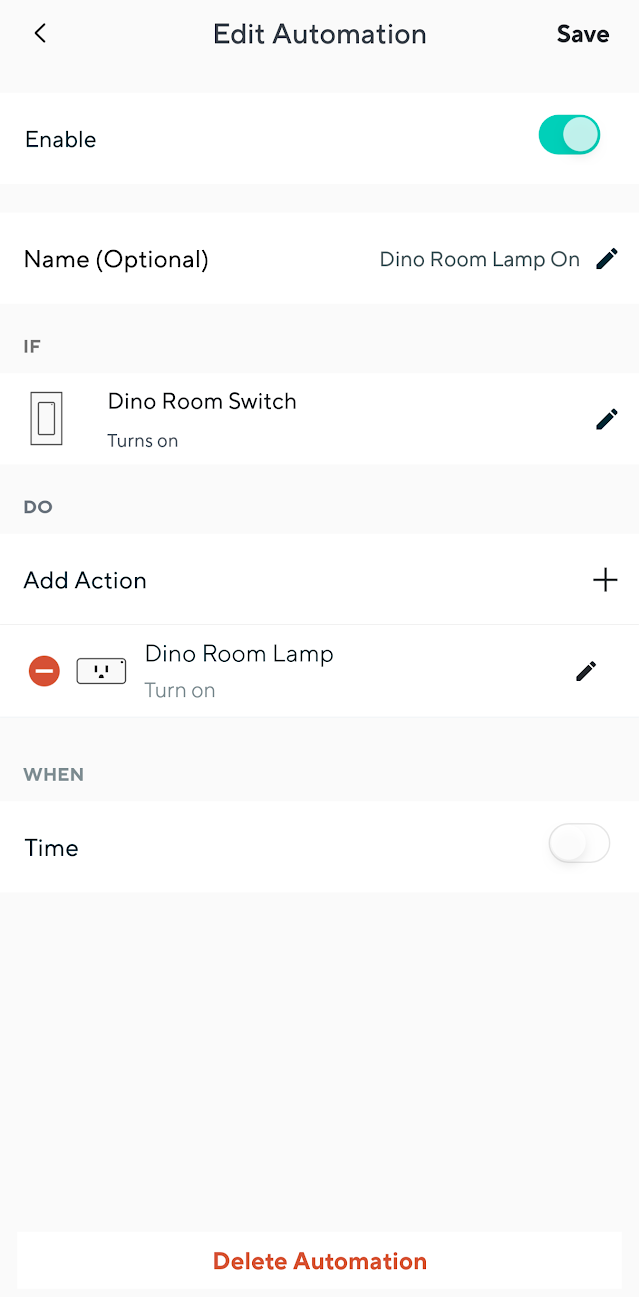
In addition, the automation you would want to set is to trigger on the Switch is on and then set the action to turn on the plug. Then set another automation with the trigger for switch is off then the action would be to turn the plug off.
Certainly. Here are screenshots of my Single Press settings page, as well as the list of devices that can be added to that function:
Previously (I’m not sure how long ago, but at least at the time I installed the switch) I would have been able to select Wyze Plugs on this list as well, which is what I have been doing until now.
As I stated, creating a normal Automation (Plus button in top right corner of app → “Add Automation” → “With a device and/or service” → set desired switch as control device, “If Switch turns on” → add action “Do turn on desired plug”) does not appear to work. Nothing happens when the switch is turned on, and the Automation is not shown in the Automation History, which leads me to think it is not triggering at all.
I’ve never had any Wyze Switches, so I can’t confirm this myself, but I’ve been following your other topic and read what you wrote there about this. It seems weird to me that your “Choose Devices” screen actually shows other Switches (along with Bulb, Bulb Color, and Light Strip) but no Plugs (and I’d lump Plug Outdoor into this, too, because that’s often a more convenient option for controlling indoor things).
If I understand what “Smart Control” is supposed to do, then a single press of the Switch in this mode is supposed to act merely as a toggle (i.e., change the state from “on” to “off” or vice versa) for the selected Wyze device(s). Is that correct? If so, then this should definitely apply to Plug and Plug Outdoor in addition to Wyze lighting products, especially if it’s already applying to other Switches!
This really does seem like something Wyze may have removed without thinking, and I agree with your assessment that this

The only possible reason that immediately comes to mind for why Wyze might’ve done this relates to how Google Home treats things like smart plugs. If I navigate to a Wyze Plug’s settings in the Google Home app, then there’s a “Device type” section with options like “Light”, “Air conditioner”, “Coffee maker”, etc., and I think Google Home is designed so that certain devices can’t be controlled in certain ways. For example, if I have a Wyze Plug’s “Device type” set as “Outlet” and ask a nearby Google Home Mini to turn it off in one minute, then Google Assistant responds by saying, “Sorry. Because of potential risk to safety, I can’t schedule actions for devices configured as outlets.” If I then change the Plug’s “Device type” to “Light” and try the same voice-activated action, it succeeds. I realize that some people are going to do bone-headed things like use these to power space heaters and then muck up the automations and trigger those unintentionally or leave them running longer than intended or at times when they’re unattended, but I don’t think that means these companies should try to be in the nanny business and protect consumers from their own bad decisions. I don’t know if that’s why this happened in the Switch/Plug situation, but that seems like a conceivable explanation if it wasn’t pure oversight.
You get my vote. 
Thanks for sharing. I see what you are saying, the plugs should be there, I would have thought.
I will check mine.
Did you Open a ticket to see if it is a bug?
I voted for this as well
Yes, you understand what single-press Smart Mode is supposed to do on the Wyze Switch, be a simple toggle. The other “Additional Controls” are for more advanced actions, which I certainly understand. I even understand putting other Switches in the list of options to be controlled, because it means you could set up multiple switches to control lights consistently (For example, Switch 1 turns on Switch 2 and a light, then you can turn off Switch 2 and it will then turn off the light and Switch 1, kinda a replacement for a 3-way switch setup only “smart”). And this is how it worked since I installed the Switch, a few years ago. The Plug was an option in the Smart control list, and it just worked as expected. But something has happened since then, I suspect Wyze removed the option deliberately (rather than it being a bug) because the language in the app page for Wyze Switch Single-Press only mentions bulbs, nothing else.
The most frustrating part is that if the normal Automations actually worked for the Switch then this would be a non-issue, as I could just set up on/off Automations and be done with it.
Thank you for the vote!
It certainly was there when I set up the Switch a few years ago (and was working until recently, when I had to do a full reset of the Switch due to what seemed like a cloud issue and lost the Smart Control settings), but now it does not appear to be an option anymore. I have opened a ticket to see if it is a bug, but I suspect it was deliberately removed as the app only mentions bulbs specifically on the Smart Control page, hence my wish to get it returned. Being able to toggle a Plug from a Switch was extremely useful to me!
The use cases you describe seem totally legitimate, and I’m puzzled by why other Switches are included but Plugs and Plug Outdoors are not. Wyze’s labeling of this feature for “Wyze bulbs only” seems too narrowly-focused and doesn’t make sense if they aren’t even following their own rules (because they’re allowing Switches on the “Choose Devices” screen). I’d be frustrated by this change, too. They should fix it.
I believe you. I remember using it in the past as well.
I am experiencing a very similar issue. I had set up the switch to turn on and off the v1 floodlights in my backyard. This no longer works.
This is actually a great usage for them, and one I didn’t think of despite owning both a V1 and Pro floodlight. And I know I’m repeating myself but not being able to select these devices from the Switch settings page would be a non-issue if normal Automations actually worked.