Updated my Cam v3 and Pan v2 this morning, both installed without any issues and events are loading properly in the Android app now. Haven’t tried the Doorbell v2 yet but will update that one later and keep an eye on the connection stability. Thanks for sharing the details.
Was given a notice of this update being available. After installing, both my V3 cameras would not connect. Believe I only had this issue once before requiring to delete cameras, completely reinstall (cycling power did not work, hard reset did not work, cycled router did not work). So I removed those 2 cameras from my list, reinstalled as new, appears to be working now.
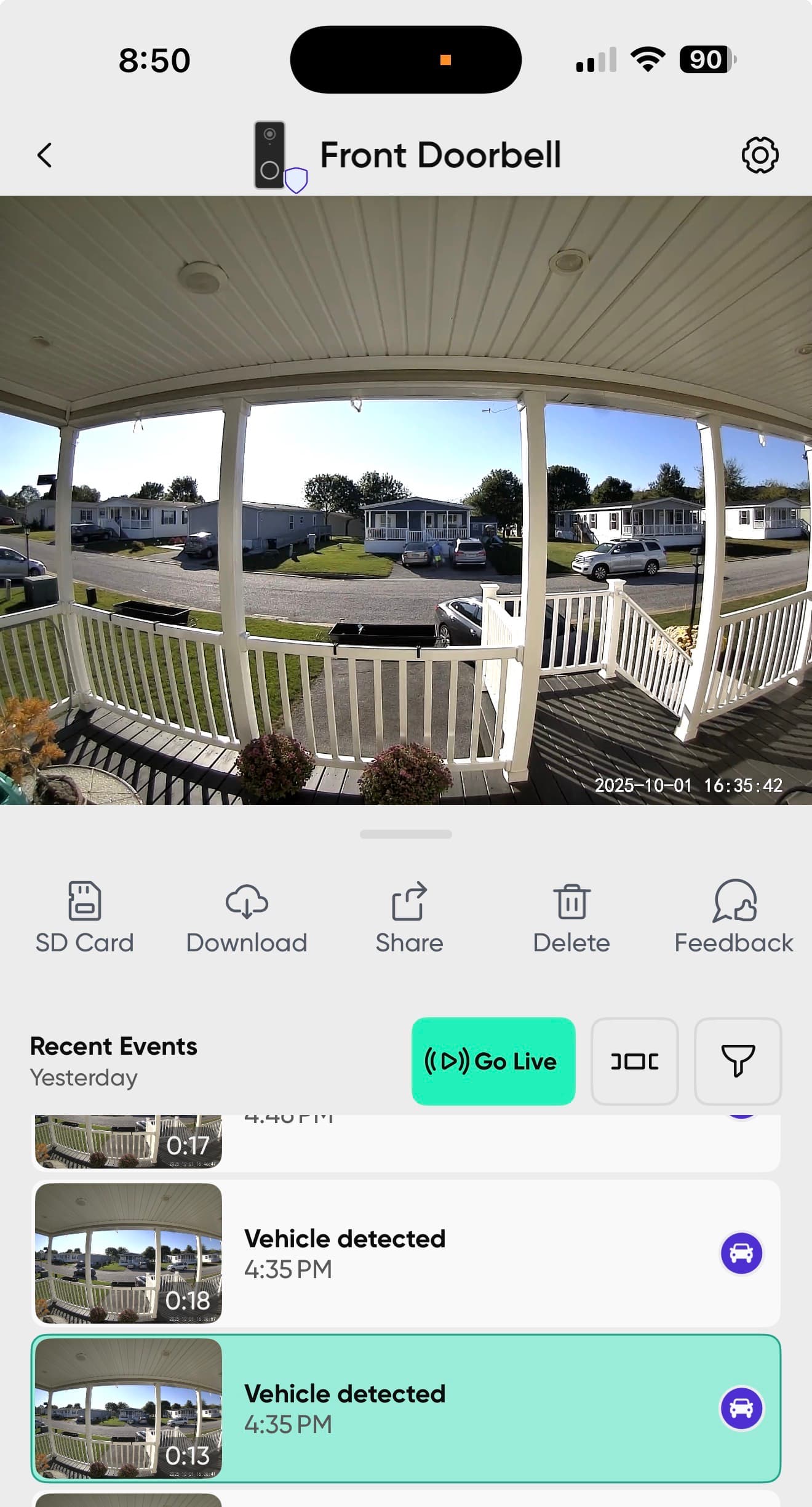
Camera is now notifying motion detected for parked vehicles, like the Pancam V4 was doing previously.
There is actually a person walking around the driveway but no cars moved.
I’ve captured many of these just over one day. I won’t fill this post up with them all.
[Mod Note]:Your topic was merged to this associated beta firmware announcement topic for better visibility to Wyze and for consistency in grouping similar issues.
They don’t look at WHAT moved, just that there was movement.
The movement triggers the cam.
Any movement.
Then it looks at what is in the picture.
Then it looks at what you want to be notified about.
You want vehicle,
It sees vehicle.
It reports a vehicle.
Your doorbell is pointed at a neighborhood/street.
Turn off vehicle detection.
Unless you want vehicles detected every minute or more all day long for every vehicle on the street and neighbor’s driveways.
I have people in vehicles selected. I want to know if there’s a car pulling up in front of my house, and I want to know if there’s a person walking around in front of my house.
I don’t wanna know that there’s a stationary vehicle sitting in my driveway.
The example I sent had a person walking so it did get some kind of actual motion but labeled it incorrectly as the person was moving, not the car.
I have examples of where nothing was moving, it just saw a car and alerted me that a car was moving. There was no motion in many of the examples. The example I sent was only to show that it did not notify me that there was a person, but instead notified me about a vehicle which was sitting still.
You are NEVER going to get vehicle notification of someone pulling up in front of your house, and not get notifications of other vehicles.
Motion is any change in the pixels on the screen, Changes of brightness, color, doesn’t matter, pixel change is pixel change, ie. motion.
Once there is motion, the picture is evaluated.
What is in the picture?
Vehicle?
Person?
Pet?
Package?
How is it supposed to determine which one to report?
Turn off vehicle detection, or, deal with constant notifications.
When it comes to “detection zone”, as far as I can tell, that is only for which pixels to watch for “motion”.
Once there are pixel changes in that zone, the entire image is processed for what is there,
If there are 14 cars and 1 person, and you want to know about both, which one does it pick to inform you of?
It picks the bigger of the 2.
Perfect in this type of stuff is still a LONG way off.
Again, I had notifications of moving vehicles in red boxes highlighting them when there was absolutely no motion in the screen whatsoever.
Also…
The software is able to detect where the motion/pixel change occurred.
That’s why it can put a little red box around where it sees motion, right?
So, my question is, why does it not identify the object within the little box as the identity of what’s causing the motion notification?
It wasn’t happening months ago, in any camera.
And why aren’t other cameras doing this also?
What you say is motion is not what the camera sees as motion.
ANY CHANGE in PIXLES is viewed by the hardware as motion.
Change in brightness, color, etc. Just because you don’t see motion doesn’t mean it didn’t “see” “motion”.
Set the motion sensitivity a lot lower.
As far as red box, I thought motion was green box… so look into that…
With your video below, I don’t see a red box, but I hear sound, and the ENTIRE screen moved, every pixel in the image changed, so that is serious motion as far as the cam is concerned, but I don’t see a red box there.
It looks and sounds like the front door was opened hard, shook the doorbell cam, and then shut.
So motion triggered an event, it looked, and said, Look, I see a car!
So stop opening and closing the front door, just use the back door from now on .
Now, I might be sounding “smart alec” but I’m not trying to be.
Yeah, I’m colorblind. Red box green box whatever if it’s a box around what it thinks is moving. I have other videos I’ll search through them to find an example of what I’m talking about. If the door slamming or whatever caused the camera to jiggle that makes sense it’s all motion. It didn’t identify anything but pixels changed, agreed.
But I know you’re half joking with some of your suggestions like using a different door, turning off car detection, etc., kind of defeats the purpose of using these cameras for security if I have to turn off all detection in order to not get false detection.
I’ve been searching for an example, I can’t find one on the front doorbell now. But it’s definitely still happening with the V4 pan cams. There’s no other motion except the camera is moving which it normally ignored in the past. But also used to mute the sound while the camera was moving so it didn’t have that sound of the motor. It doesn’t do that anymore either.
And the green box should only be identifying something that’s moving. There’s a bunch of cars out there it’s not boxing around every single one of them just the one that it thinks is moving. And without uploading 100 different videos, it detects a different car as Moving when there’s no motion, except for the camera panning.


 .
.
