You’re welcome! Thanks for sharing some additional detail, especially the photos. Those are the key, I think. I hope this helps:
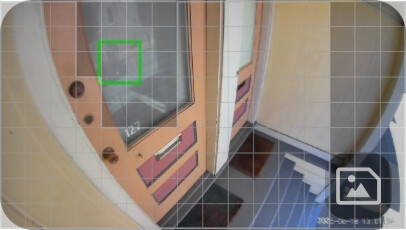
 That’s what I saw when I added the Detection Zone image as a 50% transparent overlay to one of your events with Motion Tagging enabled, and you can see that the lower-left corner of the green box is extending outside the exclusion (greyed) area in the zone you set up on the left side of the image. Because reflections like that are tricky, I’d probably tweak that area and make the grey squares cover more (if not all) of the window. It looks like you’re as low as you can go with the sensitivity setting, but if you extend the exclusion area you might be able to raise the sensitivity and find a good balance. It’ll probably take some trial and error, but that’s where I’d start.