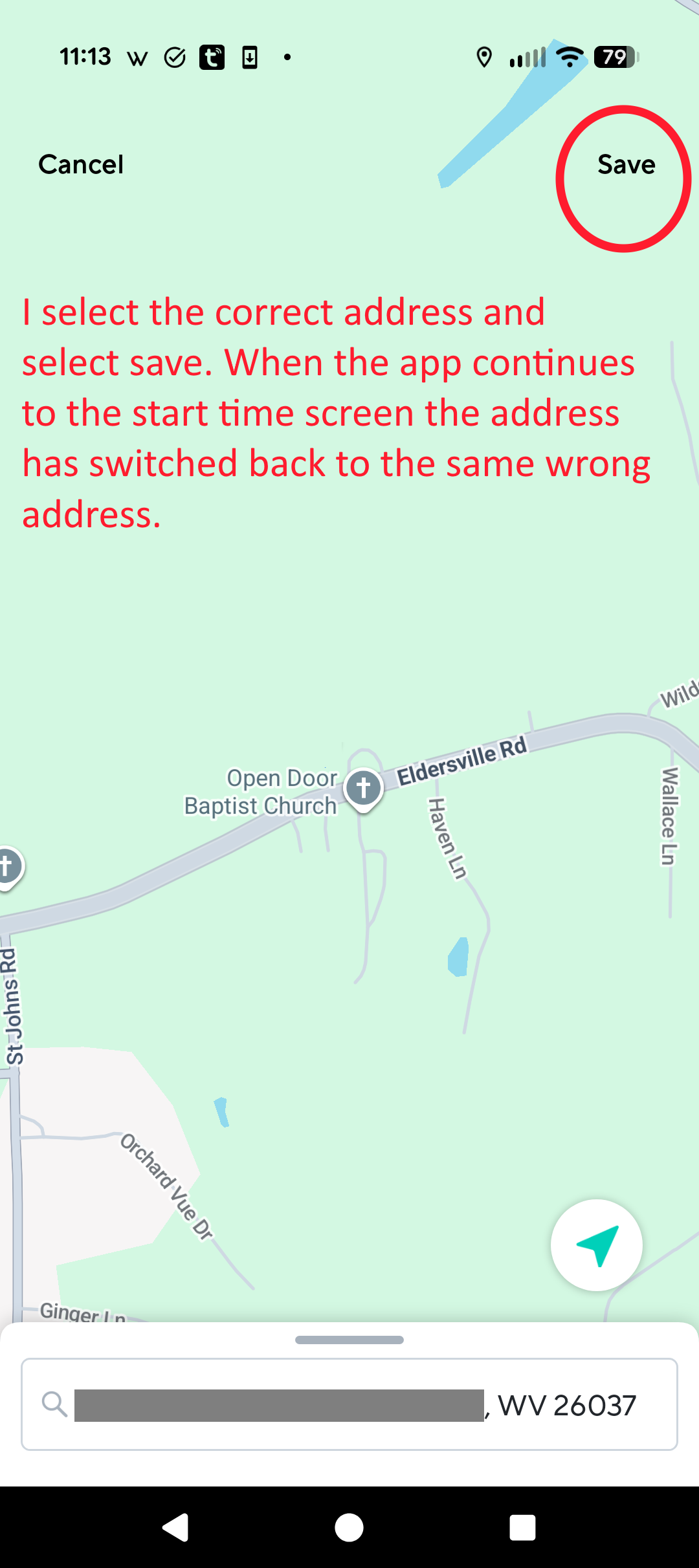
I have an automation with a sunrise sunset activation time. The default location is not correct. After I change the location and select save, the location goes back to the same incorrect location. Any idea how to fix this? It may not actually matter since the address is close to the correct location. Sunrise/sunset times would be nearly the same.
My phone is a Pixel 9 running Android version 16. The Wyze app is v3.8.0 (715)
I’ve tried with the same Android app version but am unable to replicate this. I’ve created both Schedule (now called “With a schedule”) and Device & Service Trigger (now called “With a device and/or service”) Automations (adding a “WHEN” condition to the latter) with Start Time set for Sunset and End Time set for Sunrise. The app is requiring me to set a location each time I create a new Automation in this way, but if I exit the app and go back to check the Automations, they appear to be retaining the location (street address) I set, including when I re-launch the app after clearing the in-app and OS-level app caches.
Also, when I navigate into the location selection (like in your first image where you’d tap Update ), I can grab the handle above the address to drag that drawer upward (the little bar above where you show the address in your second image), and that shows my searched location (street address) in RECENT, so that appears to be working correctly for me.
What did Support say when you contacted them? Is it possible that there’s something funky with your selected address? What happens if you try a different street address?
This is a map problem. When I search for my address on google maps it now shows my home with two different house numbers. One is correct and the other is the incorrect number used by the automation. Also, other addresses in my area are no longer correct.
An interesting thing is that my Wyze lock is using my correct address but the automation is using the second incorrect address.
I have some experience with programming. If I would call a GPS API to give me the address associated with a GPS location I would not be expecting the call to return two addresses. There would be no reason to write code to check for this. The coding for the wyze lock may be slightly different than the code for the automation. The lock allows me to select the correct address and will retain it. The automation always reverts back to the incorrect address. I neeed to send this new info to wyze support. Looks like Google needs to fix their map problem,
Note to the moderator: I redacted part of the house numbers from this image. Unfortunately it won’t make much difference for my security. My personal info was released a few months ago in the National Public Data breach that leaked over 3 billion records. All of my personal info including things far more sensitive than an address are now already out on the internet
Actually, I just ask a lot of questions and try to think about how I can gather more information when trying to solve a problem or at least understand why it’s happening. That’s annoying about your address data in the map, but I’m glad that asking the question was helpful, and I appreciate the feedback.
That stinks about your personal data, too. I understand why the Moderators try to remove potentially-revealing things from the public Forum, and I think that kind of clean-up was an even larger problem in the past when community members could reply by e-mail and often included names and addresses within their signatures. I imagine at least some of the thinking is that they don’t want the Forum to be a place where public information could potentially be harvested by spammers or worse. They can’t protect everything, but why make it easier for the bad actors, eh?
I hope this helps with the hummingbirds somehow. I’ve really enjoyed the videos you’ve posted and your clever solution for improving the images!
Hopefully Google will have the map problem corrected soon. Since the hummingbirds are gone until spring I have re-purposed the hummingbird cam. I have a problem with Raccoons. I’m using the automation to trigger the camera siren whenever a “Pet” is present. As far as Wyze cams are concerened anything with four legs is a pet I used the dawn to dusk trigger so that the sirem will only go off at night when the raccoons are active and won’t be triggering during the day when my dog is in the yard.
I was the one that flagged the post, I do apologize but usually our team will reach out to the team of mods to protect all community members. I’m glad you understand although sadly you seem to understand better than most the vulnerability of having pretty much any information at all even having observed the Internet from yards away. this being a google issue Is something good to know for the company to be aware of although obviously out of their control, but nonetheless. I’m going to keep an eye on my automations as well because of something like this. If nothing else your impact will hopefully help the greater community as well and help them solve many other issues if they run into them.
A good update on this problem. Google has corrected the map issue. My house now only has one house number and one pin on the map. The other house number moved about a mile down the road



 Solid.

 I used the dawn to dusk trigger so that the sirem will only go off at night when the raccoons are active and won’t be triggering during the day when my dog is in the yard.

