My nephew, who is no longer in the area, setup the v2 doorbell on my mom’s back door and not the front door. Everything works fine except I’m just getting a buzzing sound for the inside chime when it was wired in. I know there’s been a lot of information posted on this issue, but it got me all mixed up on how to resolve it. I’m no electrician so this is a new experience for me. The house was probably built in the late 60’s. I took a picture of the wiring of the doorbell in the hallway of my mom’s house and am posting it to see to get some help. I’m reading online that I may need to get a different transformer, but not sure what that entails. Thanks for all the help….

Welcome to the Forum, @sweigl! 
I’ll start with this: 
 I am not an electrician.
Including the photo is helpful, and I appreciate how large and clear it is! Thanks for that! 
The buzz is annoying, and I want to try to understand what your current experience is and what your goal is, so I have some questions:
- Your topic title says, “No chime…”, but then your post says, “Everything works fine….” Describing more about your experience would be helpful, like does the chime sound at all when Video Doorbell v2’s button is pressed?
- Do you have buttons (one now being Video Doorbell v2) at both the front and rear doors?
- If you have two buttons, then what happens when each is pressed?
- What was the configuration/experience prior to installing Video Doorbell v2? In other words, did you have two “dumb” buttons and did both of those actuate the mechanical chime as expected and without extraneous noise?
- Do you hear a buzzing sound constantly or only when a button is pressed?
- Is the desire to have the doorbell button press make the chime ring the FRONT door sound? With these two-button chimes, what’s wired to the REAR terminal typically produces only a single tone (“ding” instead of “ding-dong”) so that people within the home can tell which button has been pressed and which door to answer.
- If you want the Video Doorbell v2 to ring the FRONT sound, then would you still want a doorbell button to also ring REAR?
- What’s the current transformer’s rated specifications? You would typically see this stamped or engraved somewhere in the transformer’s housing, and it should show one number for V AC (or more likely just V) and another for VA. For instance, the transformer I’ve used to power my Video Doorbell v2 is rated 16 V AC, 10 VA (though I’ve consistently measured in excess of 18 V from it).
- Do you have a multimeter? As a non-electrician who likes DIY stuff, I’ve gotten a lot of use out of an inexpensive multimeter that has served me well for a number of years and has been tremendously helpful in troubleshooting my own Video Doorbell v2 issues.
- If you have a multimeter, then what voltage do you measure at the transformer and at Video Doorbell v2’s wiring location?
Your post and photo also make me think of another recent topic: Possible to have a regular doorbell on one door and Doorbell v2 on the other?. That one still seems to be an open question, though as I’ve said in that topic my experience so far is only with mechanical chimes, so I would expect a solution to your issue to be much more straightforward.
Strange: the board is upside down and the rear chime plunger has a piece of sponge on top of it?
That’s normal:
Learned something new today. I only have a front door with a push button doorbell & ding dong chime that is 47 years old. 
Then it’s a good day!
I’m away from home and wasn’t sure but just looked at a photo for my home’s mechanical chime. It has a rubber bumper that blocks the plunger/striker from one of the tone bars for the REAR doorbell. My home doesn’t have wiring to a rear doorbell location, but if the chime was wired to support separate doorbell buttons, then I would expect to hear a “ding-dong” when the FRONT button is pressed and only a “ding” or “dong” when the REAR button is pressed.
Thanks Crease for the questions:
- The doorbell on the outside does have a ding/dong sound. but only a buzzing sound on the inside.
- My mother has one front door old style doorbell which doesn’t get used. The rear door has the new Wyze Doorbell v2 which used to have an old style doorbell.
- When you press the v2 doorbell it has the ding/dong sound outside.
- The front door doorbell still works and actuates the mechanical chime inside. The new v2 doorbell on the backdoor just creates the buzzing sound.
- It would be nice if there a difference in ding dong sounds between the front and back door, but it’s not necessary…
- I don’t know what the transformer inside specs are, but I can find out.
- I have an old analog multimeter, not real good with it, though.
After looking at the picture I took and enlarging it, it appears to say on the bottom right “16V 10VA". At least that’s what it seems to be…
Okay, that doesn’t answer all my questions, but it’s a good start!
Rather than going through and using numbers this time, I’ll respond to your quoted responses and ask some follow-up questions along the way. I hope this makes sense.
I think this is the electronic sound you hear from the Video Doorbell v2’s speaker on the outside. I’m still not sure why the chime is only buzzing inside. One thing you might check is to see how you have Video Doorbell v2’s Settings ➜ Chime ➜ Doorbell Chime Type set. You probably have it set for Mechanical, which would be appropriate. If not, then please make that change and see what happens when you press Video Doorbell v2’s button. I don’t think that’s going to solve this problem, because I’m unsure of your current wiring. I’ll get to that below.
Good to know. FRONT and REAR are really going to matter with respect to how you want the mechanical doorbell to sound. In other words—with this mechanical chime (looking at your photo), two doorbell buttons, the front door button wired to the FRONT terminal, and the rear door button wired to the REAR terminal—the front button should actuate the FRONT solenoid on the left and produce two tones, and the rear button should actuate the REAR solenoid on the right and produce a single tone. That’s arbitrary, though: If you want the rear door button to make a two-tone “ding-dong”, then you’d wire it to the chime’s FRONT terminal and vice versa.
Please note that I’m trying to be clear as I write this and will attempt to spell out the specific terminal labels in all caps: FRONT, TRANS, REAR. I hope that makes sense. Feel free to ask questions if I’m unclear or you have other thoughts as we work through this.
So this is the “dumb” button (regular doorbell button)? What sound does the chime make? Is it a single tone only or a two-tone ding-dong?
I think we might be able to do that, but my primary goal is to make sure the Video Doorbell v2 is wired correctly and actuating the mechanical chime with the “ding-dong” (assuming that’s what you want). Once we’ve accomplished that, then we can reconnect the front doorbell button for the single-tone chime sound, I think.
I would guess it’s adequate if your Video Doorbell v2 is otherwise behaving as expected (showing a live view in the app, etc.). It’d be good to know, though, just to have a better understanding of what’s happening in this system. If you can grab a photo of that, that might be helpful. I’d expect to see something with one red wire attached to one terminal on the load side and one white wire attached to another terminal on the load side.
I have a few questions about how the chime and doorbell buttons were acting before the Video Doorbell v2 was installed:
- Although you said the front doorbell “doesn’t get used”, were both it and the rear doorbell button working as expected before?
- Does this system have just the two (front and rear) button locations, a single mechanical chime, and a single transformer?
- While going through the in-app installation instructions, I believe the app prompts the user at one point to take a photo of the chime’s original wiring prior to installing Chime Controller. Did your nephew take a “before” photo, and do you have that available to share?
That’s good to know. I don’t have any experience using those (I have only a couple of digital multimeters), but if you can use it to measure AC voltage and perhaps continuity or resistance, then we can do some wiring traces if we need to in order to figure out what’s happening in your system.
Are you talking about the original photo you posted above or an actual transformer photo? In your original photo, the molded plastic housing on the right side shows a wiring diagram that illustrates how your chime, transformer, and any buttons should be connected. That shows that the chime expects to see a 16V 10VA transformer, and I suspect this is what you have installed somewhere in the home. (Mine’s in a mechanical room in the basement, but the transformer itself could be anywhere.) If you can snag a picture of the transformer and share that, then that could be helpful here.
As I look at the photo in your first post, I’m not really understanding why you have two red wires from your wall connected to TRANS and white wires apparently connected to FRONT (via Chime Controller) and REAR. What I would expect to see (and what the molded plastic wiring diagram shows) is all of your “common”[1] wires connected together (often with a wire nut behind the chime) and three wires of the same color coming into the chime box and attached to the three different terminals (FRONT, TRANS, and REAR). For instance, if you’re using 2-conductor bell wire with red and white insulation, I would expect to see this:
- Your transformer with two terminals (It could have more than two terminals, but only two would be used for this.) would have a red wire connected to one terminal and a white wire connected to the other terminal.
- Your rear doorbell button location would have a red wire and a white wire. When you connect Video Doorbell v2 to this, it doesn’t matter which wire goes to which terminal.
- Your front doorbell button likewise would have a red wire and a white wire connected to it.
- Your chime should then have all three wire pairs meeting at that location. If you’re treating white as “common”, then these three wires would be connected together with a wire nut and could be tucked out of the way. This would leave three red wires (one from each pair).
I realize this is a lot of information, so I’ll stop here for now and await your responses and questions. If you don’t have the “before” photo of your chime or other information about how the system was working before your nephew installed Video Doorbell v2, then we can talk about how to proceed with testing/tracing your wiring with your multimeter, but I don’t want to overwhelm you or jump into that just yet without knowing more.
I think you can get this working. We may just have to disconnect some stuff to figure out what your wiring situation is and treat this like a starting-from-scratch installation. Assuming that your transformer is good, the wires are all intact, and your mechanical chime functions normally, this is totally doable.
2025-12-25T10:08:03Z Edit: Because I tend to be a visual learner, I gave this some more thought and decided to do a kind of overlay of your photo’s wiring diagram to show how I think the wires should run.

In this diagram…
- The red lines represent the red wires in your 2-conductor pairs.
- The white lines represent the white wires in your 2-conductor pairs.
- The green circle represents the junction where your three white “common” wires should all be connected together.
- A plain doorbell is wired at the front door button location and connected to your REAR chime terminal so that a button press sounds a single tone.
- Video Doorbell v2 is wired at the back door button location and connected to your FRONT chime terminal so that a button press sounds two tones (normal ding-dong).
- Chime Controller isn’t shown but will be added to the circuit using the standard wiring scheme once the proper wiring is confirmed and pressing each doorbell button gives the expected result.
Hopefully this all makes sense. If the wiring isn’t currently the way it should be in order to give these results—and seeing two red wires from your house attached to the TRANS terminal in your original photo has me suspecting that it is not—then my next phase in getting this wired properly would be to use the multimeter to determine which wires coming into your chime box are which (i.e., which pair of wires goes back to the transformer, which pair goes to the front door, and which pair goes to the back door).
2025-12-25T11:25:54Z Edit: For grins I added Chime Controller to the wiring diagram to show what I think the expected finished product should look like:
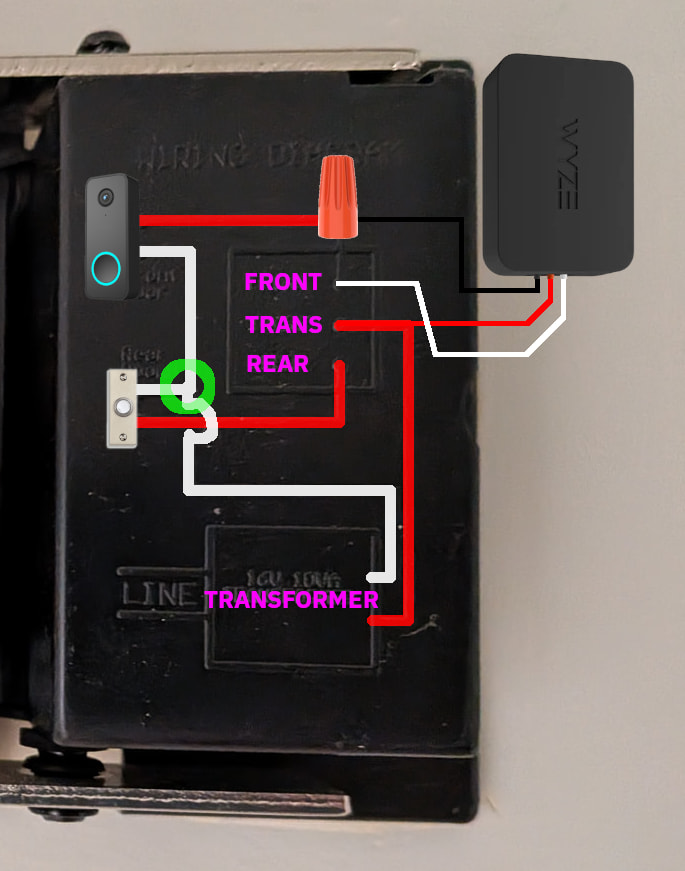
Before getting into that, though, we still need to determine what’s going on with the existing wiring in your doorbell system.
Have you been able to make any progress with this? If you haven’t done anything with the chime and Chime Controller wiring, then I still think that’s wrong without a better understanding of what your original wiring situation is/was. Seeing two different existing wires from your home attached to the TRANS terminal in your initial photo doesn’t make sense to me. 
I did go to my mother’s home and look at the chime box again. The transformer is apparently hidden in a wall cavity that is inaccessible. I feel like my options are limited other than change where the red and white wires connect to the terminals (based on your diagrams you posted) and see what happens. I really don’t have much to share other than that unfortunately. I really appreciate all of your help….
It’s not unusual for transformers to be found in various locations. Like I said, mine’s in a basement mechanical room and is easily accessible. Your mother’s transformer could be in a similar location (i.e., near a furnace), next to a breaker panel, behind the mechanical chime (if you take that off the wall to see what the wiring situation is coming into the chime), or elsewhere. Some Forum users have reported finding their doorbell transformers in attics or closets.
I’ll mention/ask this again, too:
Even if you can’t find the transformer or don’t have that photo, you could still potentially use your multimeter to do some testing and determine which wires are connected to what devices within your system. If I was working on this myself, then that would be my preference rather than blindly moving wires around and hoping for the best: If you don’t know what your connections are at baseline and then run into other problems, then you’re unnecessarily complicating things for yourself, because at that point every connection is essentially unknown. That’s why I question this:
What’s the value of moving wires around if you don’t know what they’re connected to at the other ends?
If the wiring diagram (as shown in your original photo molded into the plastic housing on the right) is accurate for the way the transformer, chime, and two buttons were originally installed, and if that was all working correctly before, then I would expect to see six wires (three 2-conductor pairs where each pair has 1 red and 1 white wire) coming together at your chime, but I would also expect to see only three wires connected to your chime’s terminals, and they would all be the same color (though that’s arbitrary with “dumb” doorbell buttons), and each chime terminal would have only a single wire connected. Again, that’s my concern/confusion with this:
If you’re seeing only four wires (2 red, 2 white) coming from the wall into the chime, then I’d wonder where the other two are and what’s happening in the wall behind the chime box.
If you can’t find the transformer, then you could disconnect the Wyze Chime Controller (you already know how that’s wired now because of the photo you included in your first post) and put temporary labels on your 2 red and 2 white house wires that are currently showing in the box so that you know where those started…or at least what their current positions are (which may not be correct). Then you could disconnect those wires, pull the chime off the wall, and see what’s behind it. You might find the transformer and/or another wire pair. If the transformer is there, then you can (hopefully) see what its actual rating is (both V and VA) to make sure it’s going to provide what Video Doorbell v2 expects to see for power, and you can also test the voltage across its terminals using your multimeter’s AC voltage setting. Note: You may want to turn off the breaker for your doorbell transformer’s circuit before connecting/disconnecting these wires, but you’ll need to turn breaker on (power the transformer) when testing its voltage (see below) and when trying to determine which wire pair at the chime is actually connected to your transformer. Even if you don’t find the transformer in the wall behind your chime box, you could still try some testing to get a better idea of what’s going on with your wires.
At this point, I’d also disconnect Video Doorbell v2 and the “dumb” doorbell button so that you have free wires to test and nothing unnecessary in the system to interfere with testing. You don’t want the wire pair for any of the doorbell buttons touching at this time—not touching each other or anything else. You want all wires to be free, because you want to use the multimeter to determine which pair of wires is connected to your powered transformer (assuming its breaker is still on; if not, then you’ll need to turn on the breaker for your doorbell transformer prior to testing voltage), and you can do that by using your multimeter in AC voltage mode and methodically testing each wire pair until you see an expected voltage. What you’d be looking for is ≥16 V AC from one wire pair. Hopefully you’d also see two other wire pairs that don’t register any voltage. You’d then label this wire pair that’s showing the expected voltage as being your transformer pair and set that aside (i.e., tape it out of the way temporarily or otherwise leave a clue for yourself that you’re done with this pair now because you know what it is).
To figure out the remaining two wire pairs (assuming this is what you see), you’d want your multimeter to be set for measuring continuity or resistance.
Important:
When testing resistance/continuity, you should ensure that power to whatever circuit or circuit element you're testing is OFF in order to avoid erroneous readings and damage to your multimeter. These two loops—to your front and rear doorbell button locations—should already be disconnected from power, because you should've disconnected them previously when freeing all the wires and removing your chime from the wall, but you may want to turn off the breaker anyway and then verify that the wire pair you just set aside is no longer registering AC voltage before changing your multimeter's mode.
You’d go to your “dumb” doorbell button location and connect those two wires together so that they’re touching—making one continuous conductor. Then you’d go back to your chime location and start testing wire pairs for resistance. Note that you’d need to change your multimeter’s mode for this. When you find a pair that reads zero or close to it, then you know that you’re measuring a closed circuit—essentially one long wire going out from one multimeter probe to your doorbell button location and then coming back (because the wires are touching/connected) to the other multimeter probe. You can label that pair appropriately. Then disconnect the wires at that button location and go to the other button location to repeat the test (connect the wires together at this next button’s location and then go back to the chime box location to test from that end) with your remaining wire pair and assure yourself of the wiring pathways. Label those.
If you can do all that and get to a baseline understanding of your system’s current state, then you can connect three white wires together with a nut or other connector (again, the color is arbitrary, and I’m assuming that you’re using typical red and white bell wire pairs). This is the “common” connection noted by the green circle in one of the diagrams I posted above. That would leave you with three red wires, hopefully labeled for their connections/locations. You’d then do this:
- Connect the house red transformer wire and Chime Controller’s red wire to the TRANS terminal on the chime.
- Connect the house red front door wire to the chime’s REAR terminal (because you want only a single tone from that dumb button when you connect and press it).
- Connect the house red back door wire to Chime Controller’s black wire with a nut.
- Connect Chime Controller’s white wire to the FRONT terminal.
Then go reconnect your “dumb” doorbell button and Video Doorbell v2 to the wires at their locations, restore power to the circuit (turn the breaker on), and test.
Without knowing more about what you’re actually dealing with in your mom’s house, this is how I’d plan to proceed. If you have questions or see things you don’t expect, then feel free to ask those and/or share more photos here.
My transformer is attached to the celling in a closet on the opposite side of the wall from the chime on my dong-dong push button doorbell. 
Yeah, finding them can be tricky. I recently helped my brother-in-law resolve an issue with his Arlo video doorbell (which I installed a couple of years ago), and I’m still not sure exactly where his transformer is.
@sweigl, I don’t know where you are in this process, but I just made some edits to my previous post after having some additional thoughts.
I’ve had to hold off on exploring this any further. I’ll go to my mom’s and continue to look for the transformer in a different location. Thanks
No sweat. I just wanted to check in and to let you know that I’d made some changes to a previous reply. This has prompted me to begin composing an additional topic with some other illustrations, but that’s a work in progress and hasn’t yet been posted.