Picked up my Wyze Floodlight from Home Depot and as I’m looking it over today I noticed a discrepancy when compared to one of the pictures that Wyze advertised of it on their product web page. They have a picture showing the floodlight at a corner with one light pointing one way the other light pointing around the corner. These lights have a small hood over them that slightly extends over the top. In the Wyze picture the light pointing to the side shows the hood on the top which is impossible because, it would be on the side due to limitations of the positioning joint. There is no way to point the lights to the right or left and have the hood on the top. Wyze is falsely advertising with this picture and needs to remove it or show it as it really is. Or remove the hoods from the lights altogether. It’s disheartening when companies resort to advertising pictures that don’t show their products as they really are.
Good to know I bought 2 first one was on middle of flat wall mounting is fine, but I have already submitted 7 tickets on this thing. Just too much wrong with it
What issues are you having? I’m probably going to mount mine tomorrow or next week. I still wish it didn’t have a cool white light, that’s just too bright but I’m hoping the adjustable brightness will make it not so cool white.
The adjustable brightness will do for you I’m sure. The changes are very noticeable.
@Alfiegerner No. The specs doesn’t show 220/240V being supported for the Wyze Floodlight.

Its not as bright as Wyze claims. my old one had 2 750 lumen lights in it, that was brighter. Maybe looking directly into the light its brighter, but has a large spill. Which if you have the star light cams, this is looks good on those.
- No way to have this thing detect motion in day time.
- cannot use the motion sensor to trigger anything. I wanted to be able to set up rule when it sees motion with the PIR sensor to make all cams do the 12s clip.
- not as bright as old light
- Light comes on every time I go to my group of outside cams… My neighbors are gonna love this.
- only way to have motion detection is use the camera itself to see motion in the video… totally worthless for any outside camera
- costs more than it needs to, heck as of now, its just a basic security light with a camera plug in. Could do same with $19 motion light and a v3 save half your money.
- For some reason cannot disable the cam plus nonsense. I get a notification every time a car goes by even after going to plus menu and turning all notifications off.
Starting to think I should have took the pre order route and let everyone else beta test this, maybe I’d be excited about it, once all this is fixed. if any of its gets fixed.
Wow, all of your issues I feel are going to be an issue for me as well. Good thing I cancelled my preorder. At least I have a few months to try the one out I got at Home Depot before returning it. But it really is pointless if it can’t detect motion during the day to record a video clip. Can it be used as an outdoor light, stay on and not record anything?
Yes, you can kick it on in the app and it stays, one of the reasons I wanted this and it has a dimmer as well.
I just now turned off the camera, I live on a busy street and this cam plus thing is having a field day. on off on off on off… btw I am more than 30 feet off the road, its camera, not the PIR doing this. the whole vehicle detection thing.
I just checked. the motion sensor is off when camera is off… so either I have a light going off and on all night, or no light at all
Why in hell wasn’t this beta tested? Geeeez…
Why wasn’t it beta tested, because apparently Wyze doesn’t do it and has us do it for them and I’m not a fan a how companies use their customers as free beta testers. If a company advertised a product to do certain things, then it should do it and they certainly should know if it can’t do them prior to release.

I don’t understand what you mean by this, the camera will record motion in the daytime , it does it every time I walk by it, I have mine set to motion is detected by PIR sensor.
if it is dark then the light comes on and it will also record the motion
I don’t know what kind of settings you have set but mine does not do that.
The light also does not come on during live view unless you turn it on , but it does come on when motion is detected when it is dark
Yes that’s one thing , the speaker audio and siren are no joke
screen shot that screen. There is nothing in here to get it’s cam or any other to record. The cam itself records motion when it sees it, but I don’t want that one active.
Yeah it was embarrassing after a certain point🤣, wish that audio quality and level where on the cameras themselves.
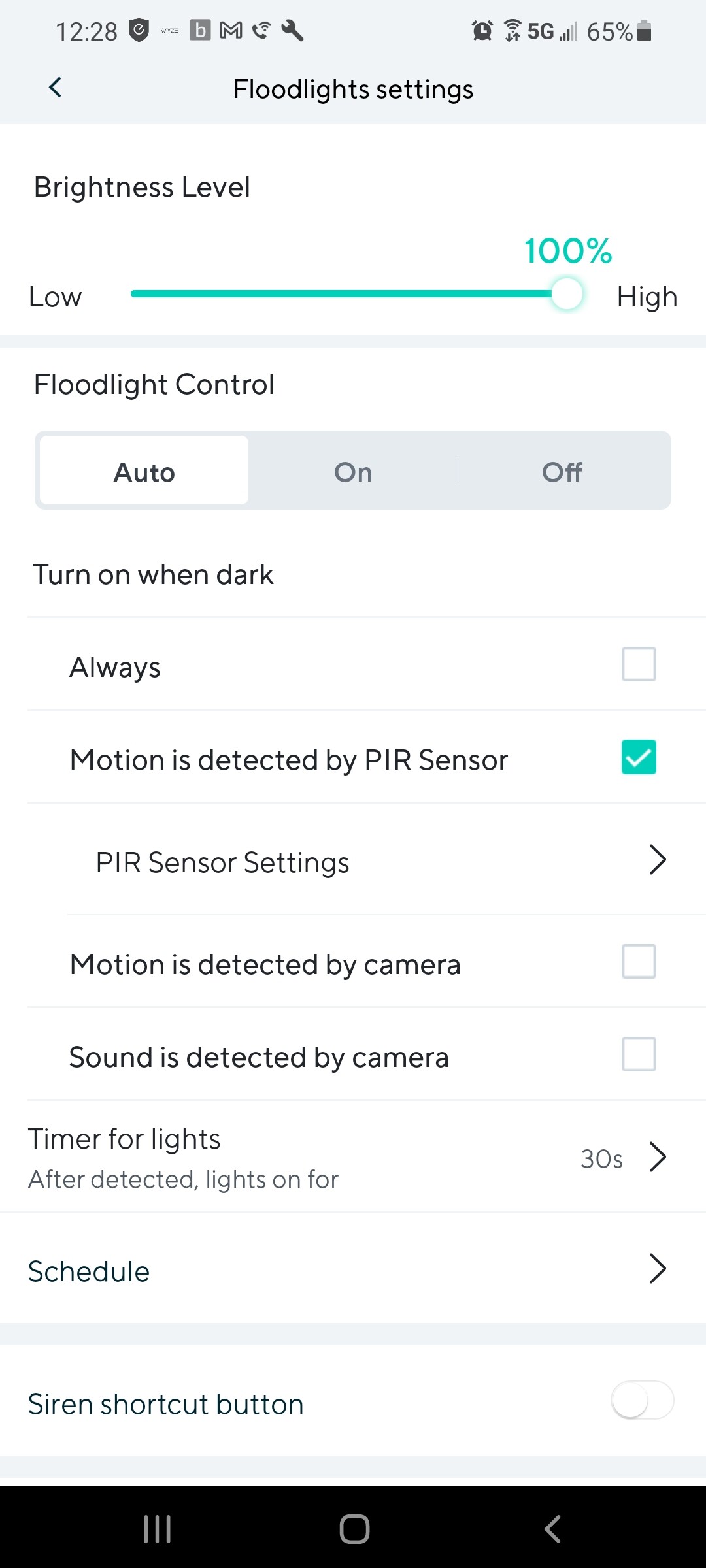
Quick question…
Will the flood light work normally with pir if I choose to turn the cam off? Or will turning the cam off also disable the floodlight and pir?
Ty
Well , yes of course ,if you turn the camera off nothing will work it is integrated
Maybe it’s not a good idea too make a decision based on one person’s post 
Installation was a breeze. I definitely had to play around with the settings and sensitivity levels for a while but I’m up and running with no issues at this point. So far so good.
I want it to record on it’s cam as well as the others outside the house. but I want only motion detected on the PIR sensor. Not the v3 sitting on the light.