Guys, wondering if someone can provide help on how to fix the image issue on cam pan v3 as shown in the pics

Looks like a stuck IR filter. Try repeatedly switching “Night Vision Mode” to Auto/On/Off. Do a restart if that doesn’t work.
1 Like
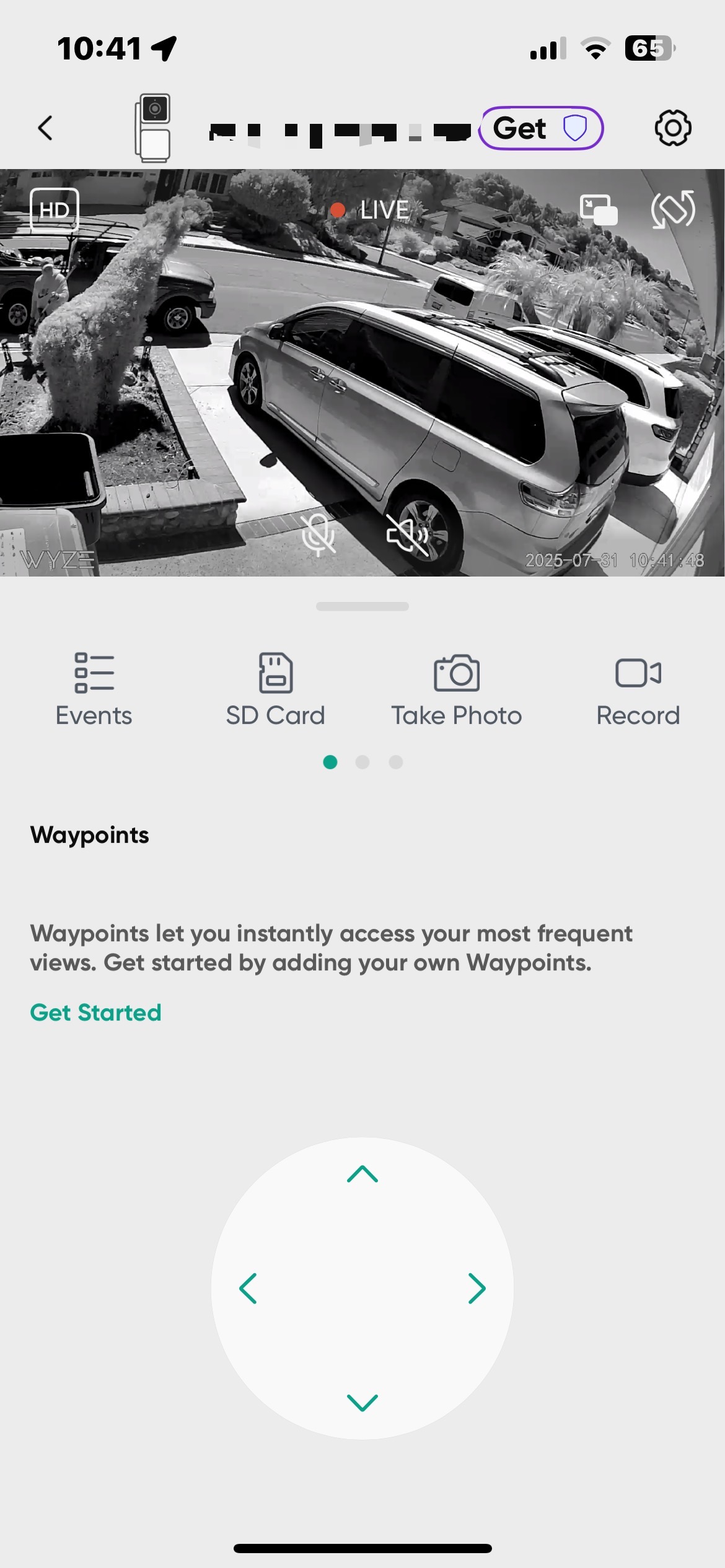
The idea is not to change the setting permanently; only to “exercise” the mechanism.
2 Likes
Also try gently tapping the camera to unstuck the filter.
1 Like
If that doesn’t work, try dropping it a short distance 3-6" on to a hard surface while on set to normal (day) mode.
I had a stubborn one that took a bit of force to unstick.
Yeah, once I dropped mine ten feet on the deck while trying to mount it on the soffit. The IR got stuck and took me a few taps to unstuck it.
I initially read that as 3-6′!  (“I know he hates Wyze cameras, but dayyum!”
  ) It’s late.
Welcome to the Forum, @harveylochen! 
If it is the IR filter, then you can also try moving a magnet around the camera, like what a Reddit user demonstrated several years ago.
2 Likes
Squeezing it in a vise as shown in my avatar is another option 
1 Like
Would have to use a ladder to do that; it’s a floodlight. Might even damage the lamps. 
This topic was automatically closed 90 days after the last reply. New replies are no longer allowed.